Built by WebbyCrown Solutions — Need setup, customization, or integration help? Talk to our team.



Odoo AI Email & Chatter Assistant – Multi-Provider (OpenAI, Claude, Vertex)
Availability
❌ Odoo Online
✅ Odoo.sh
✅ On Premise
Product Version
19.0
$103.88

Odoo AI Assistant - Email & Chatter Automation for HR, Sales & All Odoo Modules
What Is Odoo AI Email & ChatterAssistant?
Teams spend hours each week writing the same kinds of messages - follow-up emails, support replies, interview invites, project updates. Done manually, every reply means switching screens, copying context, and re-typing tone the team already agreed on. Generic AI tools don't help much either: they sit outside Odoo and have no idea what's on the record they're replying to.
Odoo AI Email & Chatter Assistant brings that drafting into Odoo and grounds it in real data. It reads the record's fields, recent chatter history, and related documents, then composes a polished email or suggests a chatter reply you can accept, edit, or send. Prompt templates keep tone and structure consistent across teams, quick prompts handle short replies and follow-ups in one click, and administrators control providers, costs, and access from one settings area. The result is faster, more accurate communication that respects your business context.
Key Benefits

Context-Aware Drafts
The assistant reads record data and chatter history, so emails and replies reflect the actual conversation, not a generic template.

Email and Chatter in One
Compose full emails and accept or edit chatter suggestions from inside the same record - no screen switching.

Consistent Brand Voice
Reusable prompt templates keep tone, structure, and instructions aligned across sales, HR, and support teams.

Multi-Provider Flexibility
Choose the AI provider that fits your cost, compliance, and workflow needs, with fallbacks per use case.

Usage Control and Governance
Logs, rate limits, and quotas keep AI costs predictable and usage controlled across teams.

Works Across Every Module
Use the same assistant for Sales, HR, Support, Projects, Marketing, and custom models.
Modules & Features
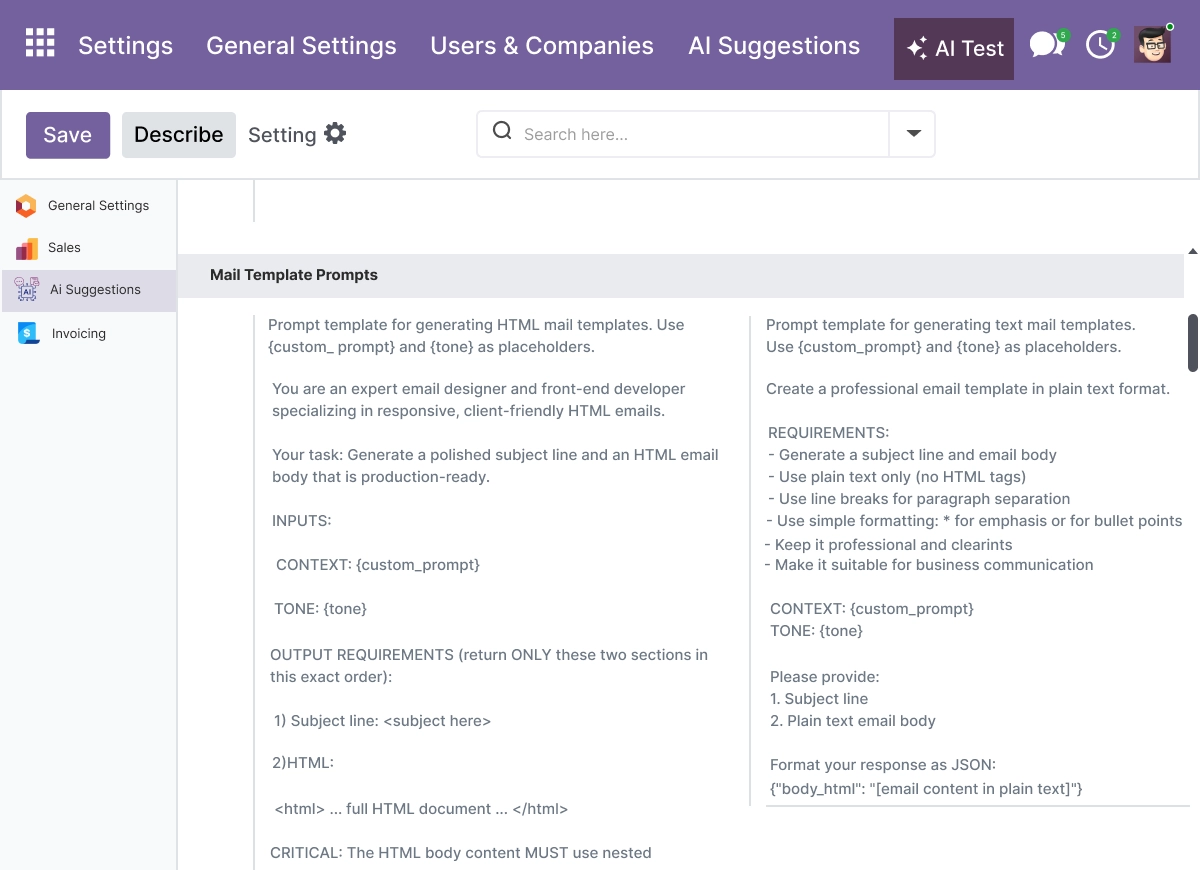
AI Email Composition - Polished Drafts With Subject and Body
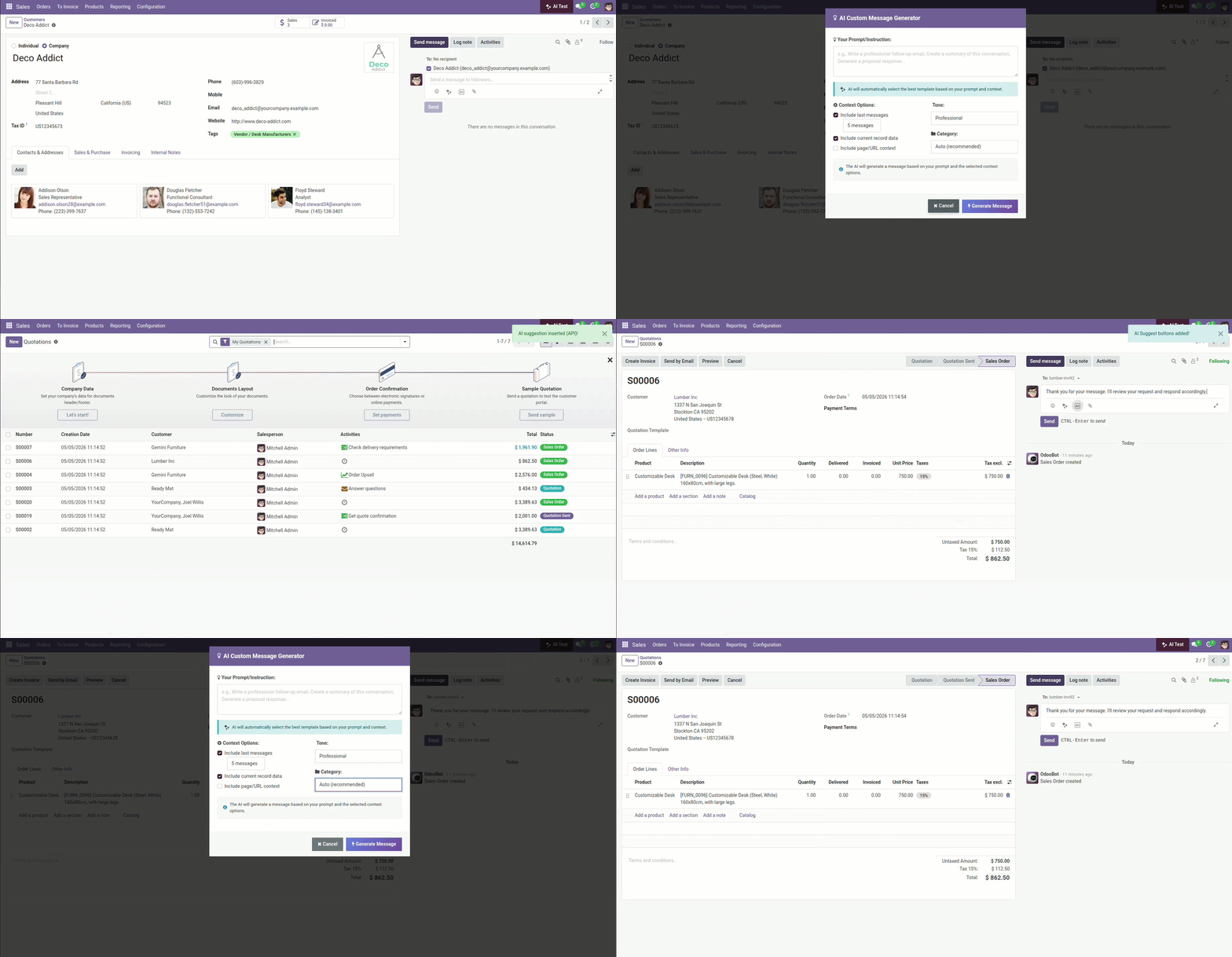
The Odoo AI Email Composer generates polished, HTML-ready emails with subject and body, and the live listing says it uses table-based HTML so messages render correctly across email clients. This is the core tool for AI-powered email composition and email template generation inside Odoo.
- Generate complete email drafts with subject line and body
- Produce HTML-ready messages that render consistently across email clients
- Draft follow-ups, offers, and outreach grounded in record data
- Edit any draft before sending - the AI proposes, you decide
- Speed up email writing without leaving the Odoo record
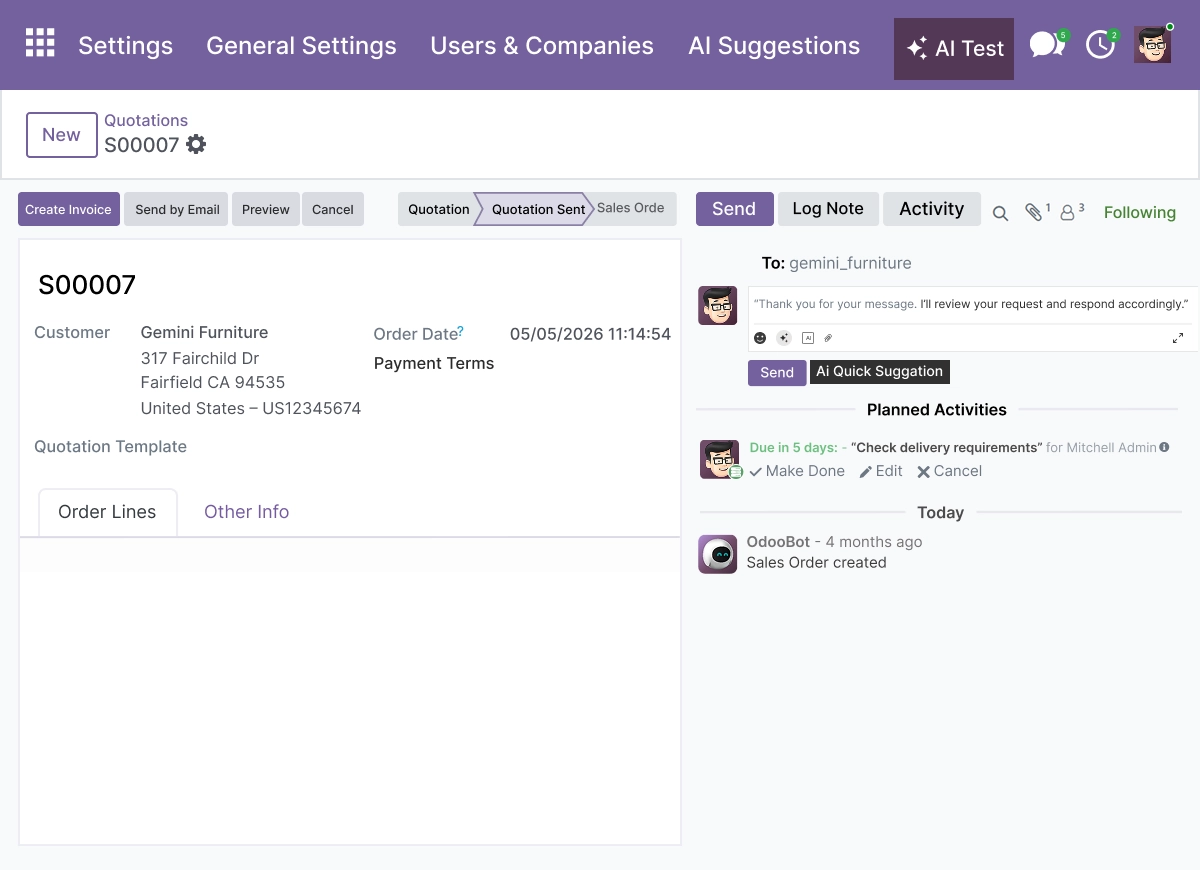
Chatter Message Suggestions - Reply Without Leaving the Record
Get in-context chatter AI suggestions directly in the chatter pane. Users can accept, edit, or send replies without leaving the record, which keeps natural language responses tied to the current status and record data.
- Get in-context reply suggestions directly in the chatter pane
- Accept, edit, or send suggested replies in a click
- Keep responses tied to the current record and conversation
- Speed up follow-up communication on any document
- Reduce time spent switching between screens
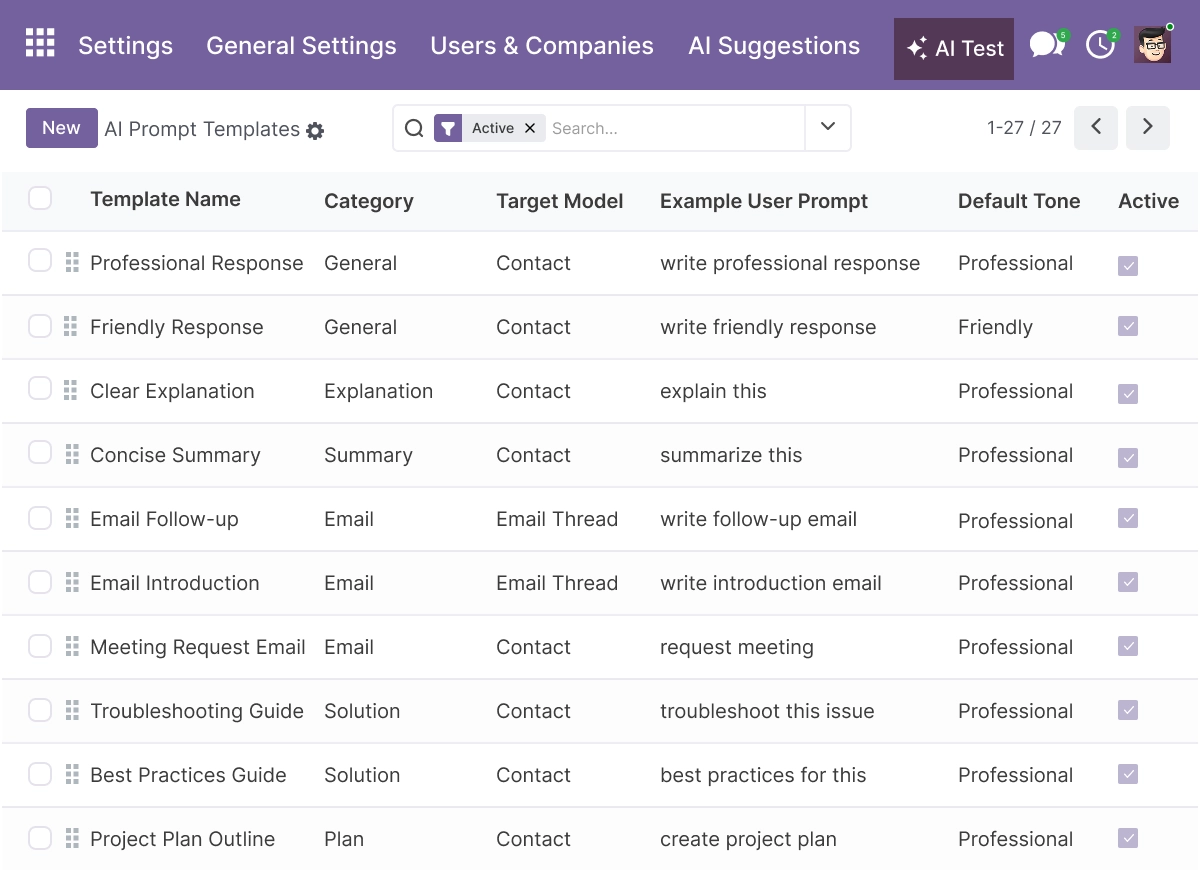
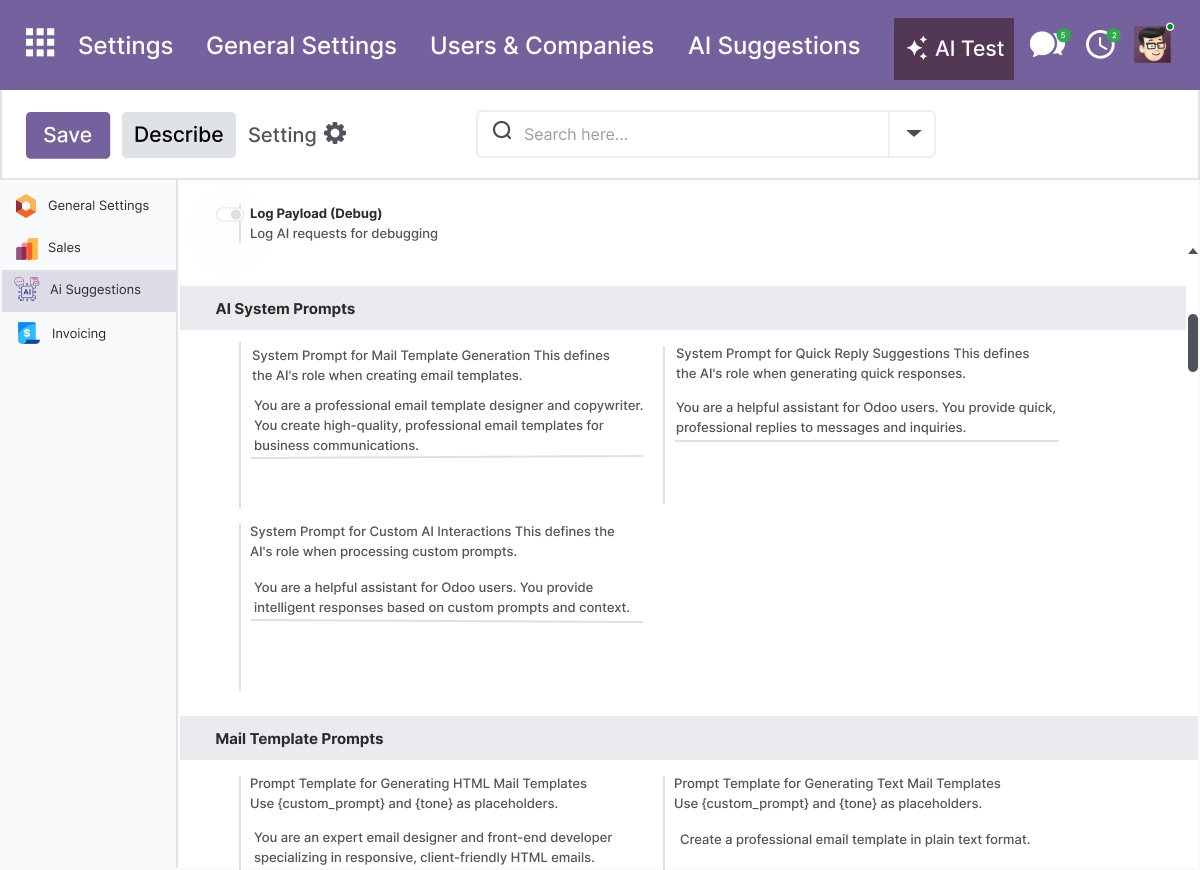
Custom Prompt Templates - Standardize How Teams Write
Create custom prompt templates for sales follow-ups, offer letters, support triage, HR messages, and onboarding instructions. This is the module’s template layer for consistent communication, branded tone, and one-click reuse across teams.
- Build reusable prompt templates for sales, HR, and support
- Cover offer letters, onboarding messages, and support triage
- Keep tone and structure consistent across the team
- Reuse templates with one click instead of rewriting
- Maintain a consistent brand voice across communication
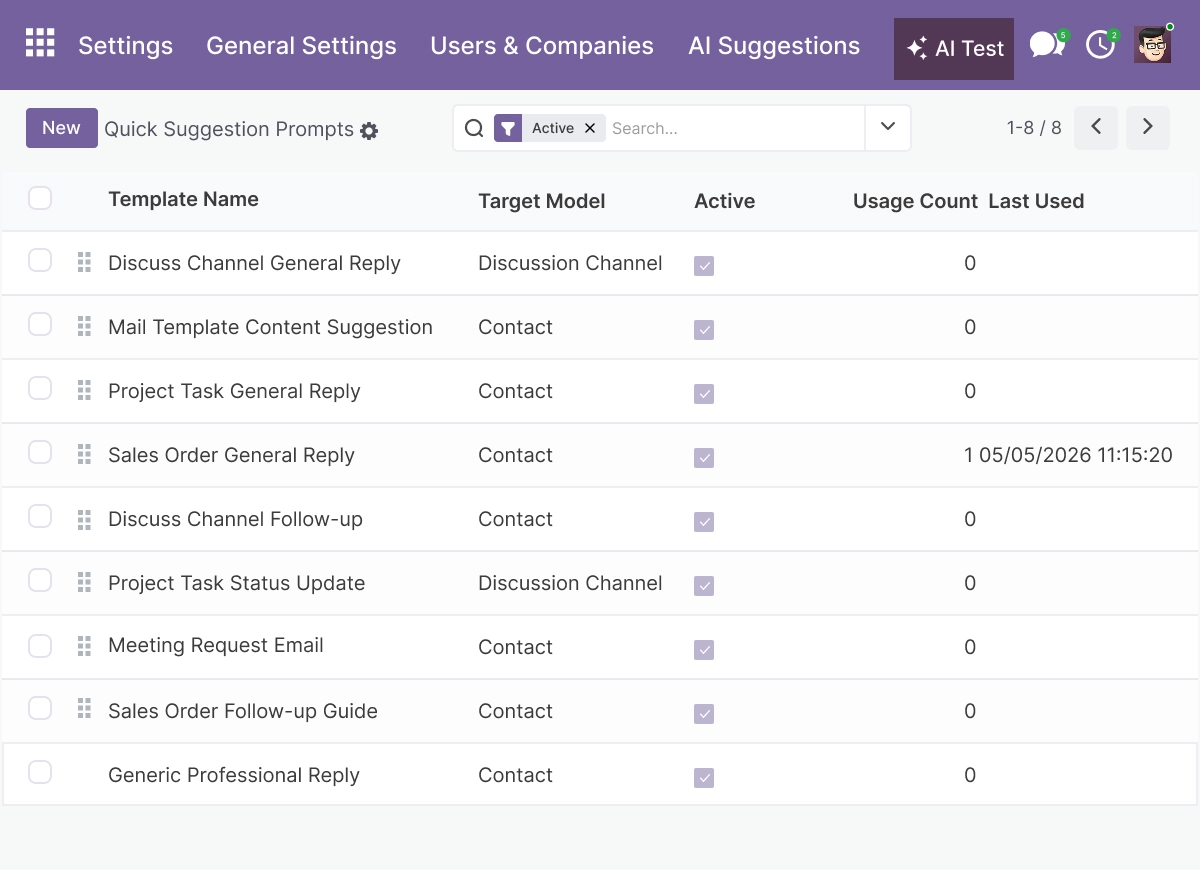
Quick Suggestion Prompts - One-Click Replies and Follow-Ups
Use one-click prompts for short responses, follow-ups, escalation notes, and full drafts that can be edited before sending. The live listing highlights quick suggestion prompts as a core way to answer questions and generate clear next steps quickly.
- Generate short replies, follow-ups, and escalation notes in one click
- Produce full drafts that can be edited before sending
- Handle repetitive communication tasks faster
- Suggest clear next steps alongside each reply
- Reduce manual writing for high-volume messaging
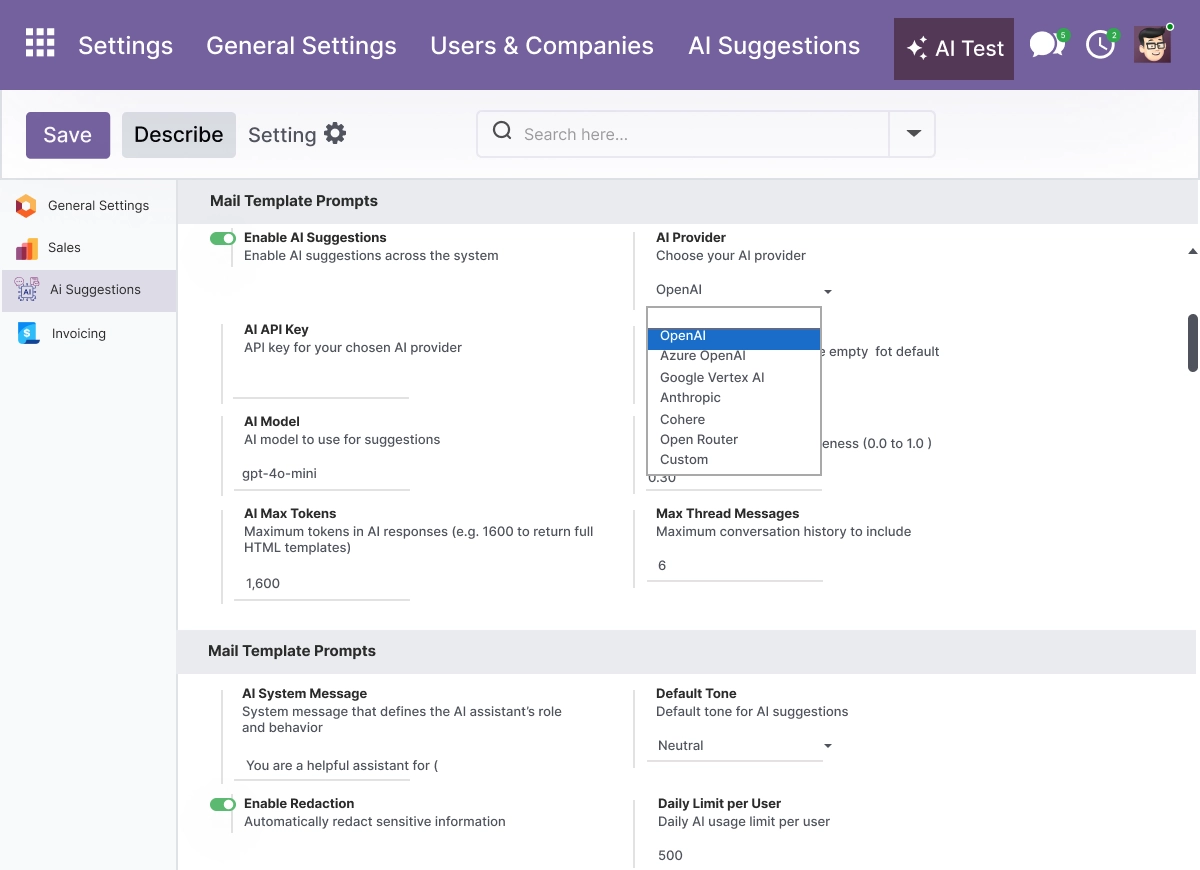
Multi-Provider Architecture - Choose Your AI Provider
Monitor AI calls, usage, and costs with logs, rate limits, and governance controls. This helps teams manage workflow risk, protect budgets, and keep errors low while using AI features at scale.
- Connect OpenAI, Anthropic Claude, Azure OpenAI, Google Vertex AI, OpenRouter, Cohere, or custom endpoints
- Switch providers based on cost, use case, or compliance needs
- Set fallback providers for resilience
- Match vendor preferences and data requirements
- Keep provider configuration centralized in settings
Context-Aware Responses - Grounded in Your Data
Switch between providers or set fallbacks per use case. The listing supports OpenAI, Anthropic Claude, Azure OpenAI, Google Vertex AI, OpenRouter, Cohere, and custom endpoints for flexible external providers and AI solutions.
- Combine record fields, chatter history, and related documents
- Produce replies that respect the conversation and business rules
- Keep responses relevant and accurate across models
- Improve reply quality for sales, support, and projects
- Apply configurable prompts to control how the AI responds
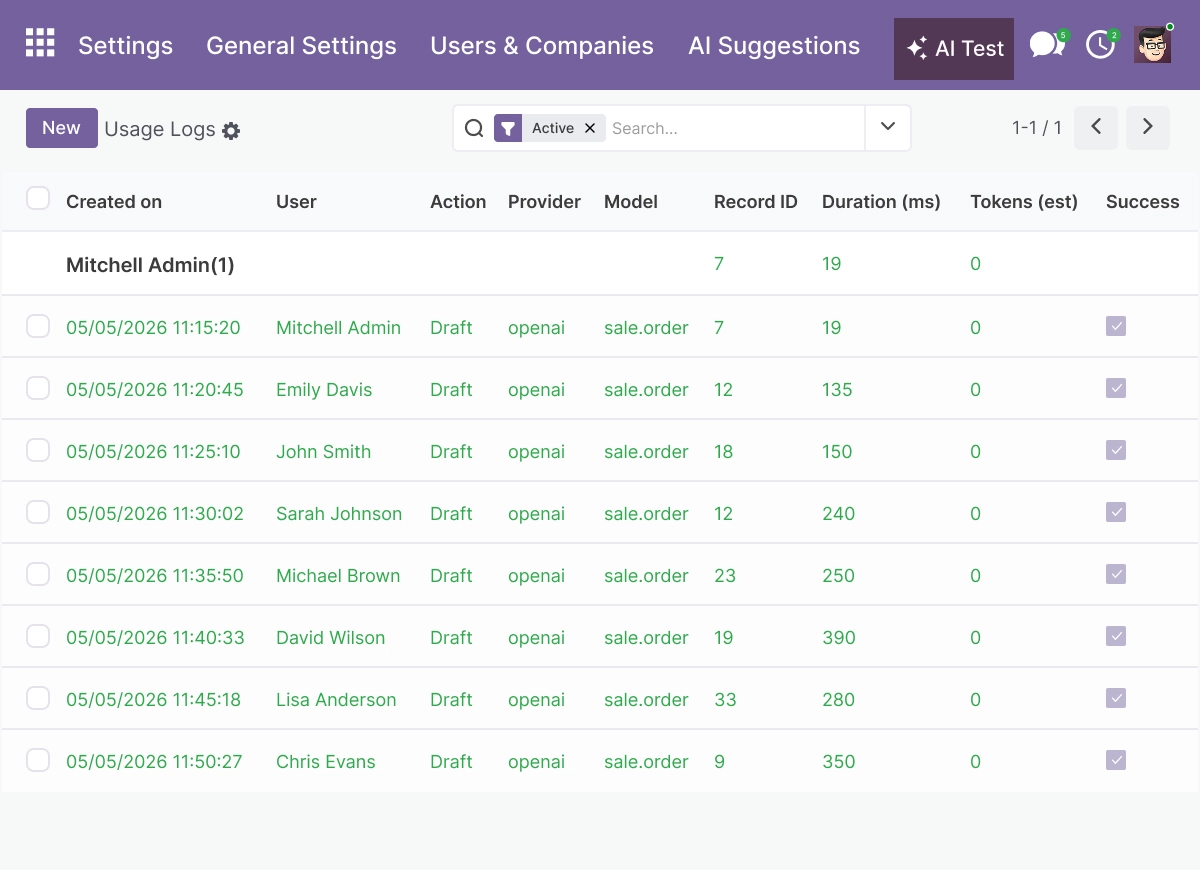
Usage Tracking and Governance - Control Cost and Access
The assistant combines record data, chatter history, and configurable prompts to create replies that respect the conversation and business rules. This makes responses more relevant, more accurate, and easier to use in sales, support, projects, and operations.
- Track AI calls, usage, and cost with detailed logs
- Set rate limits and quotas to protect budgets
- Restrict AI features by user role
- Control which record fields are sent to the AI provider
- Keep AI usage controlled and consistent at scale
Cross-Module Use Cases - One Assistant, Every Team
Use the assistant across Sales, HR, Support, Projects, Marketing, and Events. The live page specifically highlights follow-ups, interview invites, support replies, project updates, and event invitations as practical workflows.
- Support sales with leads, follow-ups, and outreach
- Help HR with onboarding messages and interview invites
- Improve support replies and ticket handling
- Send project updates and status messages
- Assist marketing and operations communication workflows
Advanced Settings and Configuration
All AI options are managed from a centralized settings area in Discuss (mail). From one place, administrators select AI providers, manage prompt templates, set access rights, and review usage logs.
Settings are grouped so teams can enable or disable email composition, chatter suggestions, and template generation per user role. Field-level controls and provider preferences govern exactly which record data and documents are sent to external providers, helping protect sensitive information and keep costs predictable.
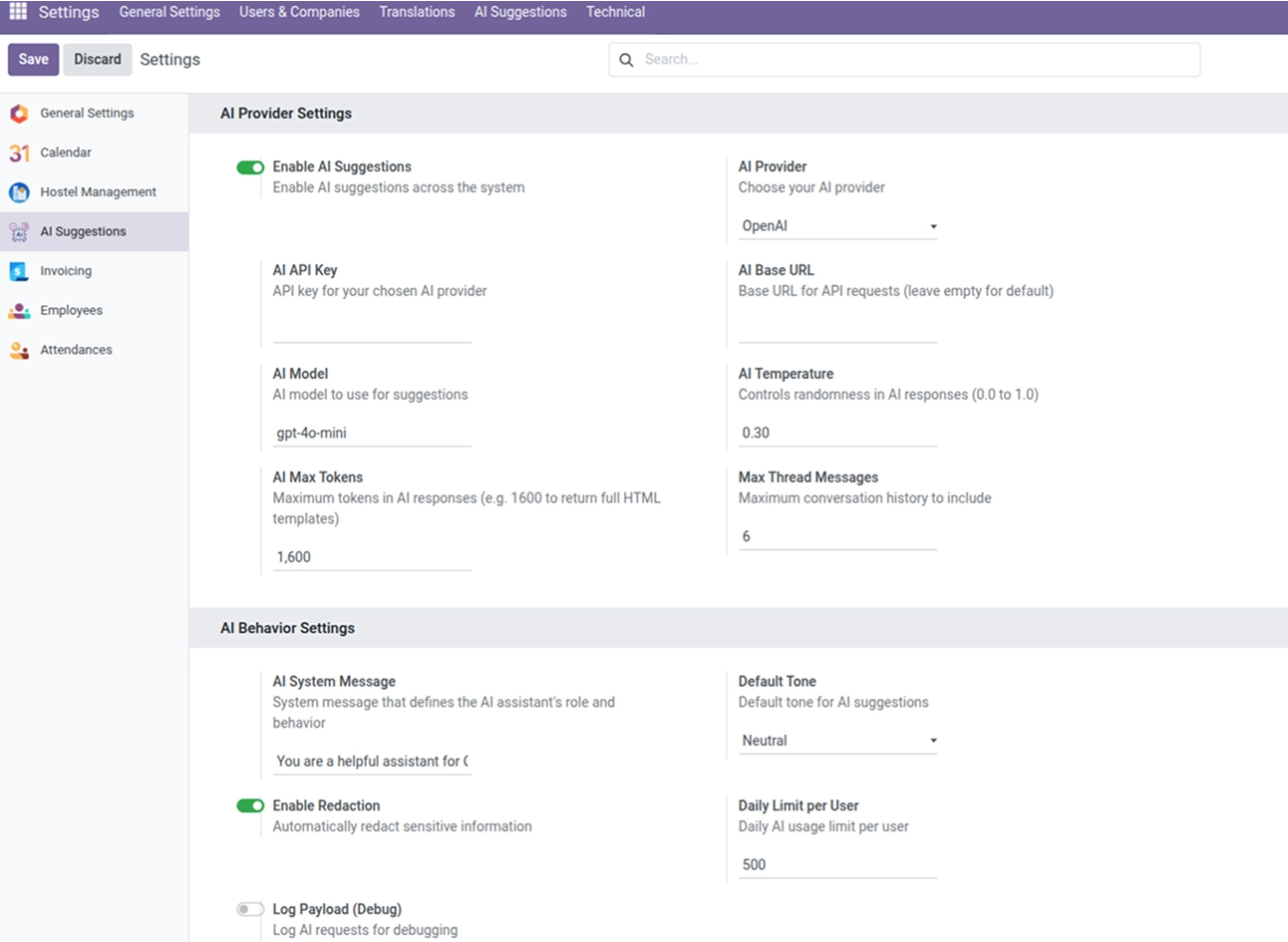
The configuration covers:
- AI provider selection and fallback behavior
- Prompt template management for sales, HR, and support
- Feature toggles for email composition, chatter suggestions, and templates
- Usage logs, rate limits, and quotas
- Field-level controls over what data is sent to the provider
- Access rights by user role
How to Set Up Odoo AI Email & Chatter Assistant
01
Install the App
Install the app in your supported Odoo environment.
Result: AI assistant settings appear in the Discuss (mail) configuration.
Result: AI assistant settings appear in the Discuss (mail) configuration.
02
Connect an AI Provider
Select and configure your AI provider and credentials in settings.
Result: The assistant is ready to generate emails and chatter suggestions.
Result: The assistant is ready to generate emails and chatter suggestions.
03
Create Prompt Templates
Build prompt templates for your sales, HR, and support workflows.
Result: Teams reuse consistent prompts with one click.
Result: Teams reuse consistent prompts with one click.
04
Set Access, Limits, and Field Controls
Choose which roles can use each feature, set rate limits and quotas, and control which fields are sent to the provider.
Result: AI usage stays controlled, governed, and cost-aware.
Result: AI usage stays controlled, governed, and cost-aware.
05
Draft From the Record
Open any record and use the email composer or chatter suggestions.
Result: Context-aware drafts ready to edit and send.
Result: Context-aware drafts ready to edit and send.
Who Is This App For?
This app is suitable for:
- Sales teams drafting follow-ups, offers, and lead communication
- Support agents replying to tickets with context from the record
- HR teams handling onboarding, interview invites, and internal messages
- Project managers sending updates and status messages
- Operations and marketing teams standardizing communication across Odoo
- Administrators who need provider control, usage logs, and per-role limits
- Businesses running Odoo 17.0 on Odoo.sh or On Premise
This app is not suitable for businesses on Odoo Online (SaaS), or for teams that only need a standalone chatbot to query data rather than draft emails and chatter replies.
Changelog
v19.0.0 — Initial Release
- - AI Email Composition
- - Chatter Message Suggestions
- - Custom Prompt Templates
- - Quick Suggestion Prompts
- - Usage Tracking And Governance
- - Multi-Provider AI Support
- - Context-Aware Responses
What can this assistant actually write?
It composes full emails with a subject and body, and suggests chatter replies you can accept, edit, or send - all grounded in the record's data and conversation history.
Does it read the data on my Odoo records?
Yes. It uses record fields, recent chatter history, and related documents to produce context-aware drafts. Administrators control which fields are sent to the AI provider.
Which AI providers does it support?
It supports OpenAI, Anthropic Claude, Azure OpenAI, Google Vertex AI, OpenRouter, Cohere, and custom endpoints, with fallbacks you can set per use case.
Can I keep a consistent tone across my team?
Yes. Reusable prompt templates let teams standardize tone, structure, and instructions for sales, HR, support, and onboarding messages.
How do I control AI costs and access?
Usage logs, rate limits, and quotas keep costs predictable, and you can restrict features by user role from settings.
Which Odoo versions does this app support?
The app supports Odoo 17.0.
Does it work on Odoo Online, Odoo.sh, and On Premise?
It works on Odoo.sh and On Premise. It is not available for Odoo Online (SaaS).
Which Odoo apps can I use it with?
It works across all Odoo models - Sales, HR, Support, Projects, Marketing, and custom modules - anywhere there is email or chatter.