Built by WebbyCrown Solutions — Need setup, customization, or integration help? Talk to our team.



WooCommerce Multi Warehouse Plugin - Order Fulfillment, Bin Locations & Staff Portal
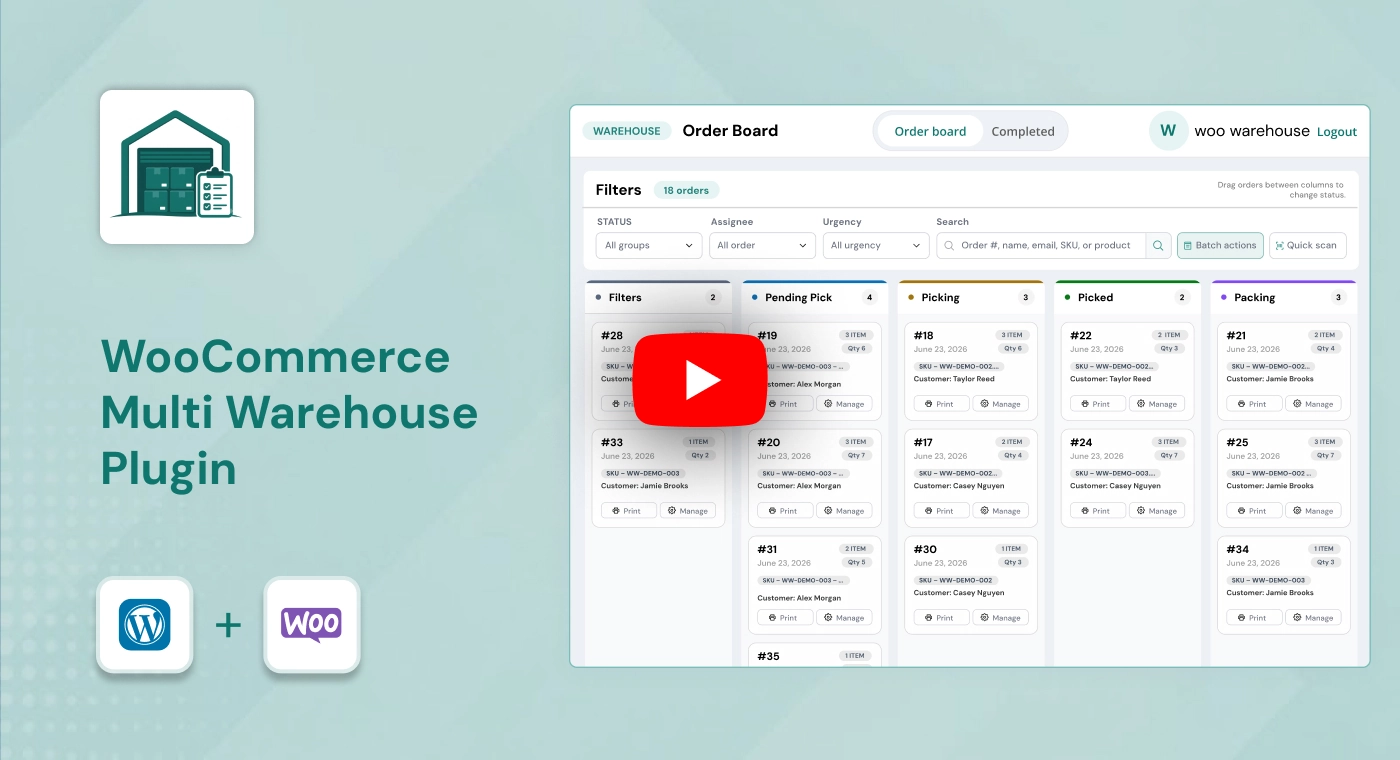
WooCommerce Multi Warehouse Plugin is a warehouse fulfillment and order-processing plugin for WooCommerce stores. It helps warehouse teams manage picking, packing, shipping, picker assignments, barcode scanning, bin locations, workflow stages, staff portal access, tracking details, and order-history logs from one structured fulfillment workspace. It focuses on order processing and warehouse task management, not warehouse-level stock allocation.


What Is WooCommerce Multi Warehouse Plugin?
Managing WooCommerce orders inside the standard WordPress admin can become difficult once a store has multiple warehouse staff, larger order volumes, picking tasks, packing workflows, shipping updates, product locations, and customer tracking requirements. Teams may struggle to see which orders are waiting, who is responsible, where products are stored, and whether an order has been picked, packed, shipped, or completed.
WooCommerce Multi Warehouse Plugin adds a structured warehouse fulfillment workflow to WooCommerce. It provides a live Kanban order board, custom fulfillment stages, picker assignments, barcode scanning, product bin locations, shipping tracking, activity history, and a dedicated frontend warehouse staff portal.
The plugin is designed to help stores organize warehouse order processing without giving every warehouse worker full access to the WordPress admin. It focuses on picking, packing, shipping, staff workflow, bin locations, and fulfillment visibility. It does not manage stock allocation between multiple warehouses or warehouse-level inventory quantities.
Key Benefits

Structured Order Fulfillment
Move WooCommerce orders through configured warehouse stages such as Picking, Packing, Ready to Ship, Shipped, and Complete.

Live Warehouse Visibility
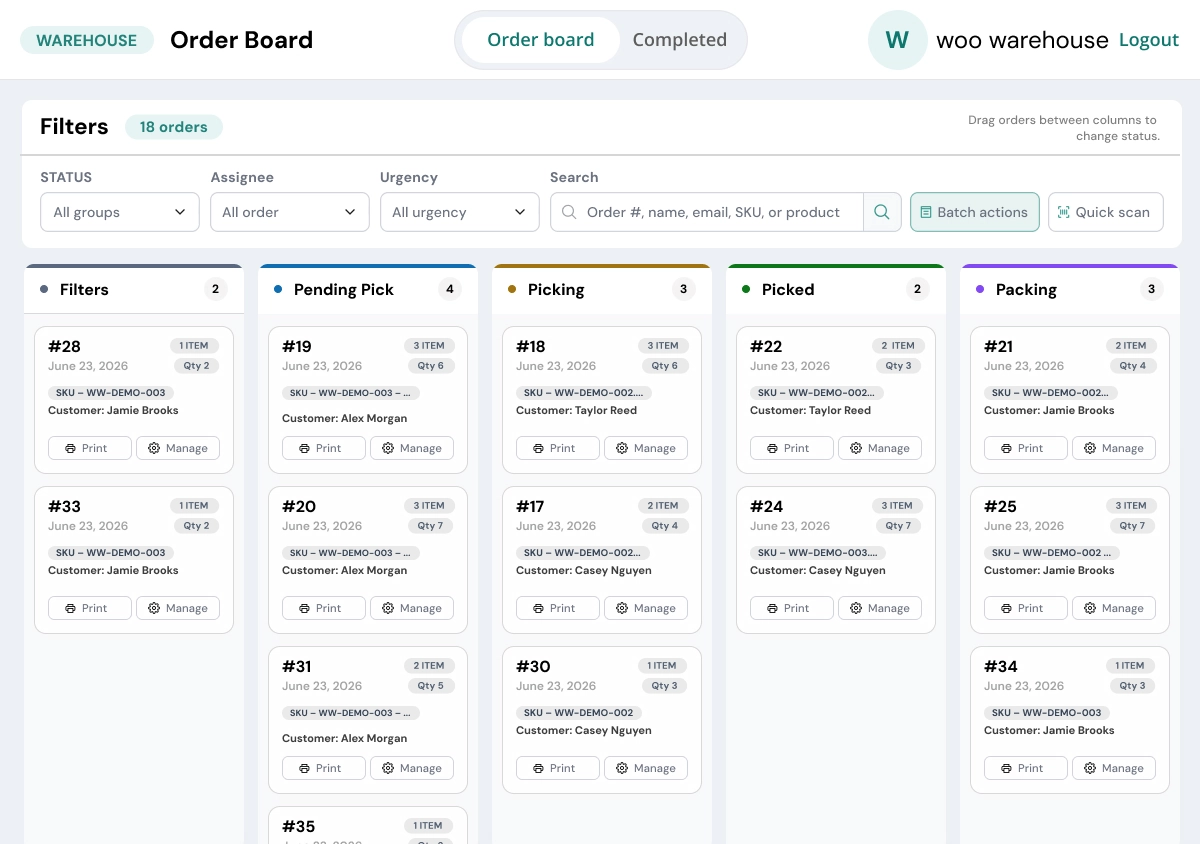
Use a visual Kanban fulfillment board to see active orders, status progress, urgency, assigned pickers, and workflow activity.

Picker Assignment & Accountability
Assign warehouse orders to specific staff members and maintain clearer ownership across fulfillment tasks.

Barcode-Assisted Picking
Scan products during picking to help warehouse teams confirm items before progressing an order through the workflow.

Bin Location Management
Store aisle, shelf, and bin details for products so pickers can locate inventory more efficiently.

Flexible Warehouse Stages
Create, color-code, edit, and reorder custom fulfillment statuses to match your real warehouse process.

Shipping Tracking Workflow
Add carrier details, tracking numbers, tracking URL templates, and customer notifications from the fulfillment process.

Dedicated Staff Portal
Give warehouse users a focused frontend workspace for assigned orders without requiring WordPress admin access.
Modules & Features
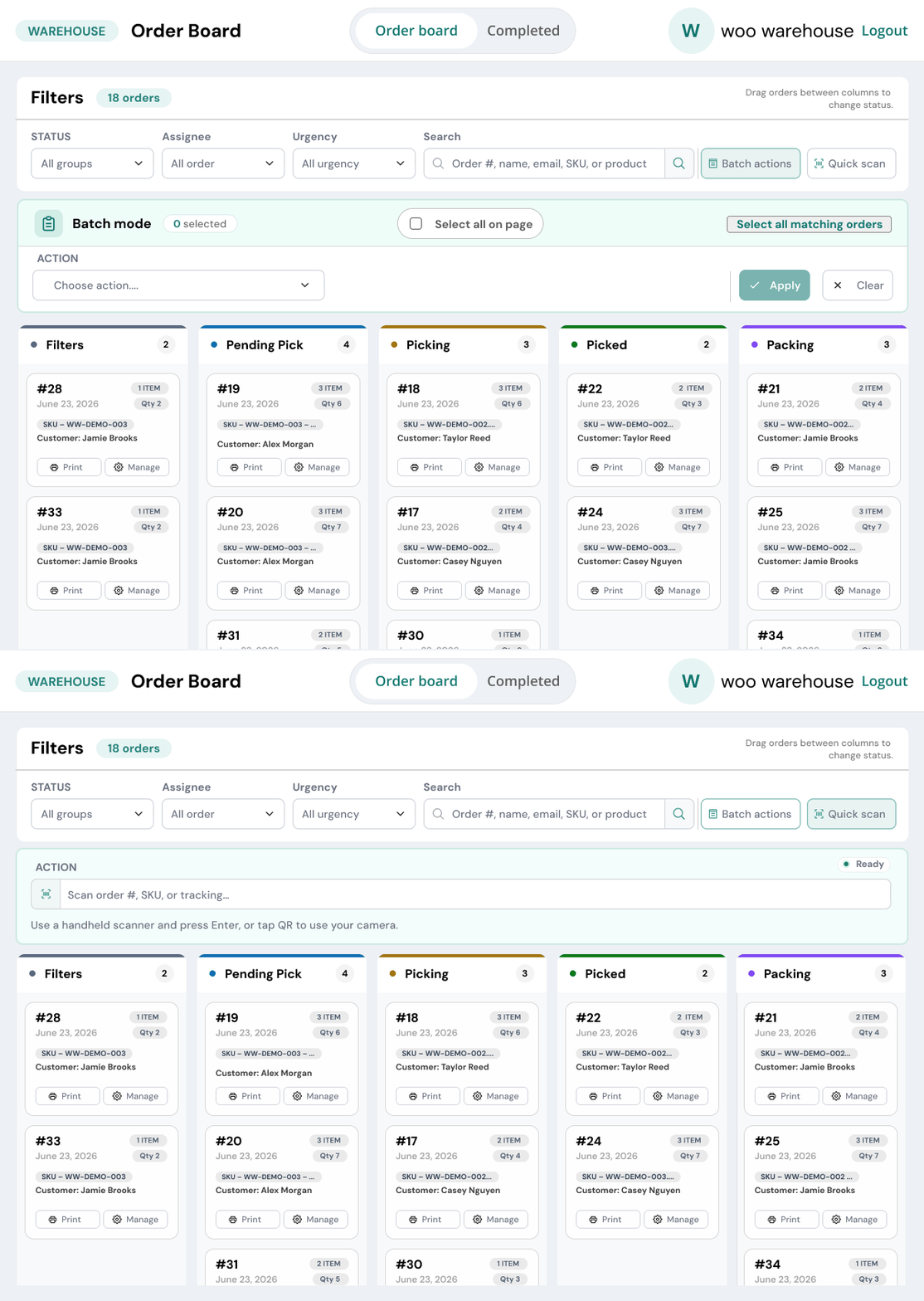
Warehouse Fulfillment Kanban Board
Manage active WooCommerce orders through a live visual fulfillment board.
- View active orders at /warehouse/orders/
- Drag orders between configured workflow stages
- Manage picking, packing, shipping, and completion flow
- Filter orders by status
- Filter orders by urgency
- Filter orders by assigned picker
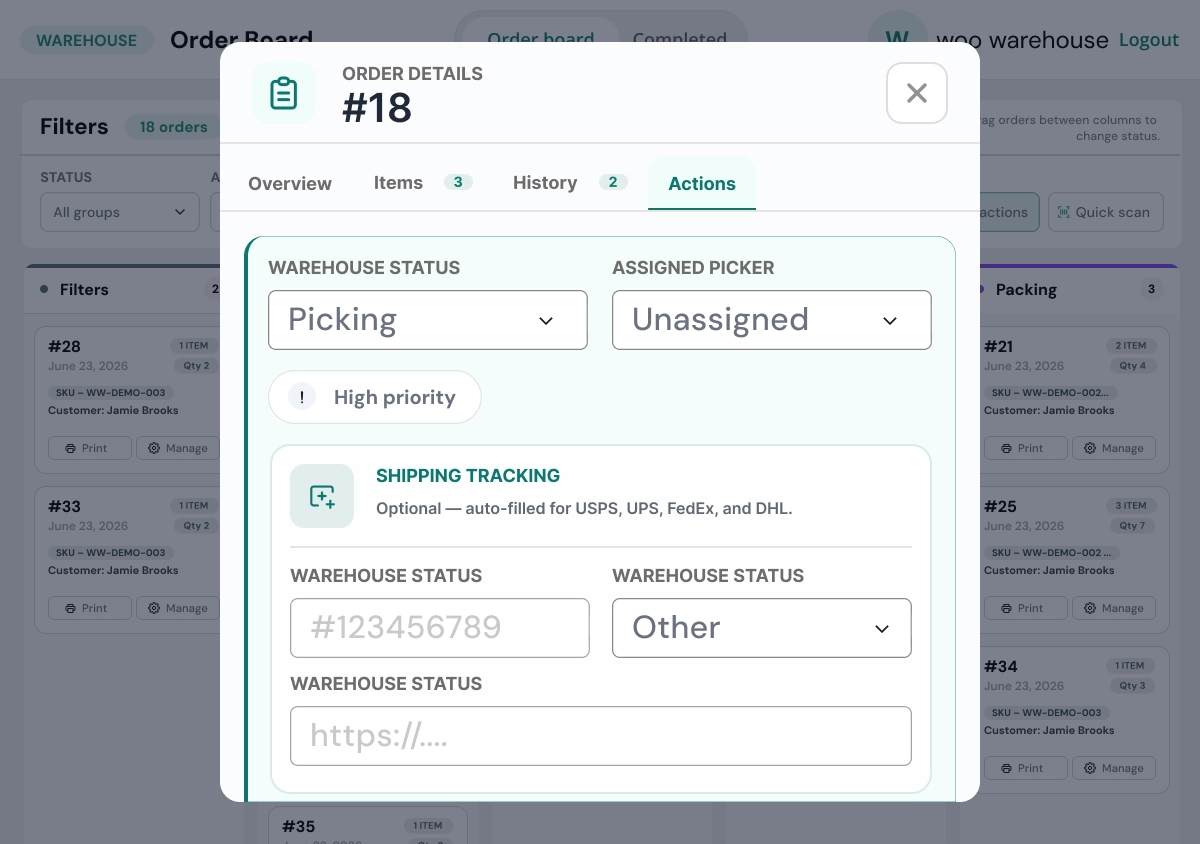
- View order details in a modal view
- Monitor warehouse activity through an auto-refresh workflow
Custom Warehouse Workflow Status
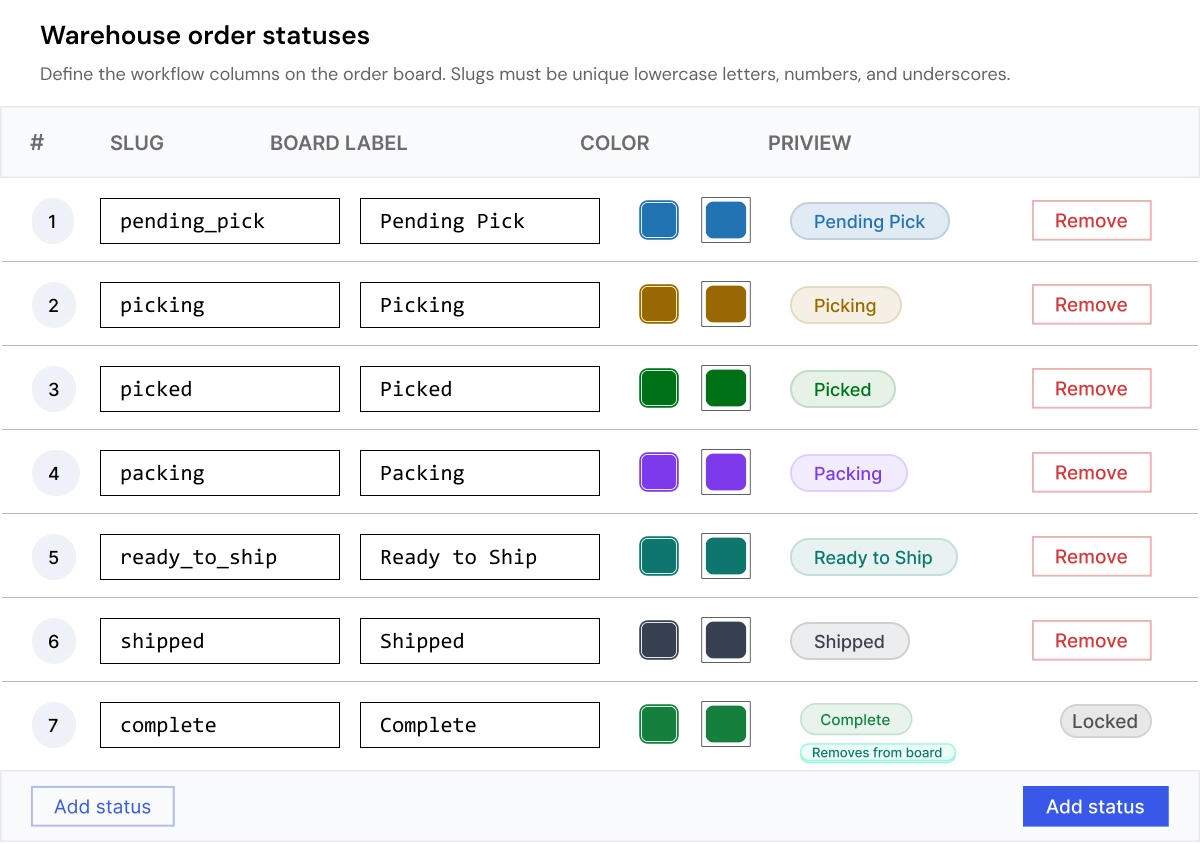
Create fulfillment stages that match the way your warehouse operates.
- Create custom warehouse statuses
- Edit workflow status labels
- Add colors to fulfillment stages
- Reorder workflow steps
- Configure stages such as Picking
- Configure stages such as Packing
- Configure stages such as Ready to Ship
- Configure stages such as Complete
- Build a fulfillment process that matches business requirements
Picker Assignment & Staff Management
Assign orders to warehouse staff and manage fulfillment responsibilities.
- Assign orders to specific pickers
- Manage warehouse staff roles
- Control picker order visibility
- Track assigned fulfillment tasks
- Improve responsibility across warehouse workflows
- Keep order ownership clearer for warehouse teams
Barcode Scanner & Bin Location Management
Support more accurate picking with barcode scanning and product-location tools.
- Scan product barcodes during picking
- Add aisle information for products
- Add shelf information for products
- Add bin-location information for products
- Validate bin locations before shipping stages
- Import bin locations through CSV
- Download sample CSV templates
- Reduce time spent locating products during picking
Order Tracking & Status History
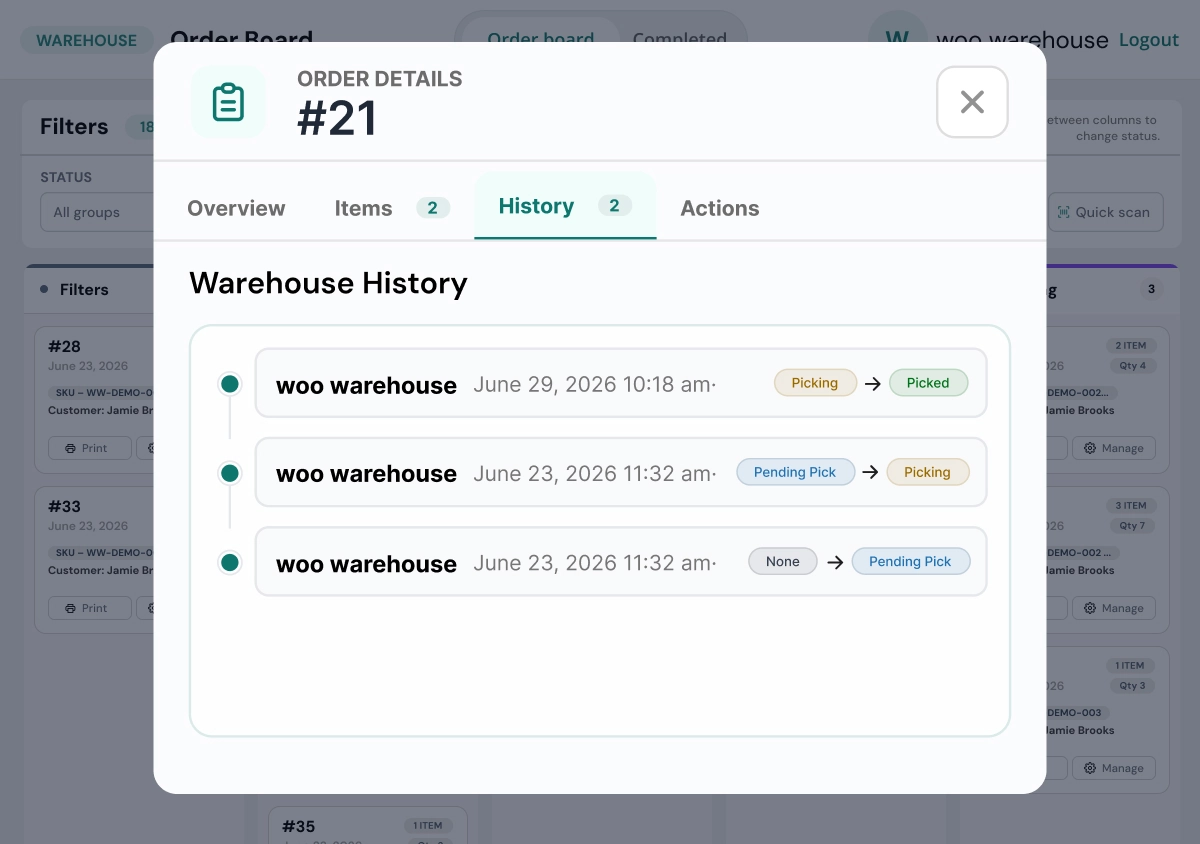
Maintain structured fulfillment activity records for each order.
- Track order-status changes
- Record who updated an order
- Store previous status details
- Store new status details
- View timestamps of fulfillment actions
- Review the order workflow history
- Improve fulfillment transparency for managers and teams
Shipping Tracking & Notifications
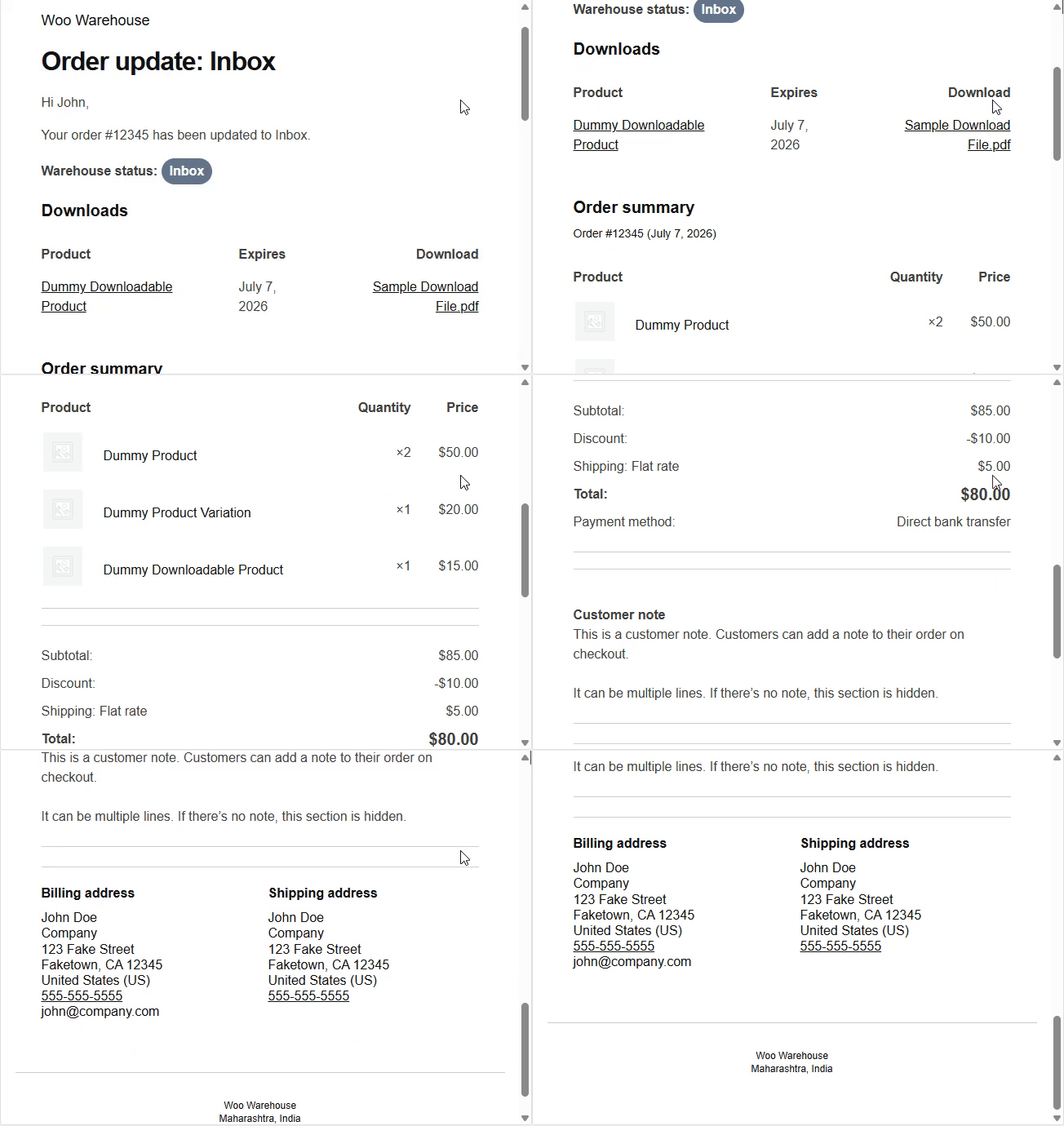
Manage shipping information directly from the warehouse fulfillment workflow.
- Configure shipping carriers
- Add tracking numbers
- Create tracking URL templates
- Trigger customer email notifications
- Keep customers informed about shipment progress
- Connect tracking details with WooCommerce order processing
Warehouse Staff Portal
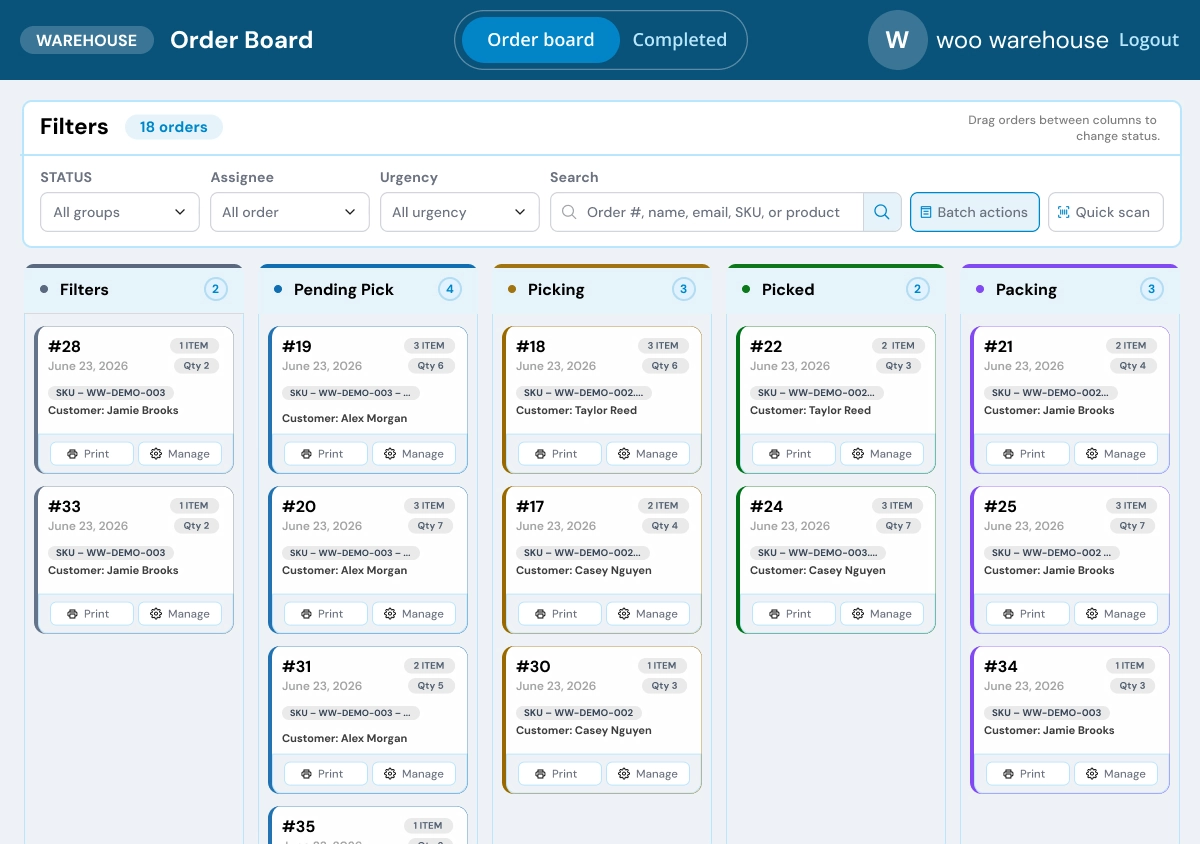
Give warehouse users a dedicated frontend workspace for order processing.
- Staff login page
- Warehouse order portal
- Picker-specific order access
- Completed-order archive
- Multiple portal themes
- Configurable orders per page
- No full WordPress admin access required
- Focused workspace for warehouse fulfillment teams
Admin & Advanced Settings
WooCommerce Multi Warehouse Plugin provides centralized WordPress administration for managing warehouse order fulfillment workflows. Administrators can configure workflow statuses, picker visibility, warehouse staff permissions, portal appearance, shipping settings, bin-location tools, tracking templates, and order-level fulfillment controls from one place.
The settings help store owners organize order-processing activity while continuing to use their existing WooCommerce products, customers, checkout, orders, payments, and shipping methods.
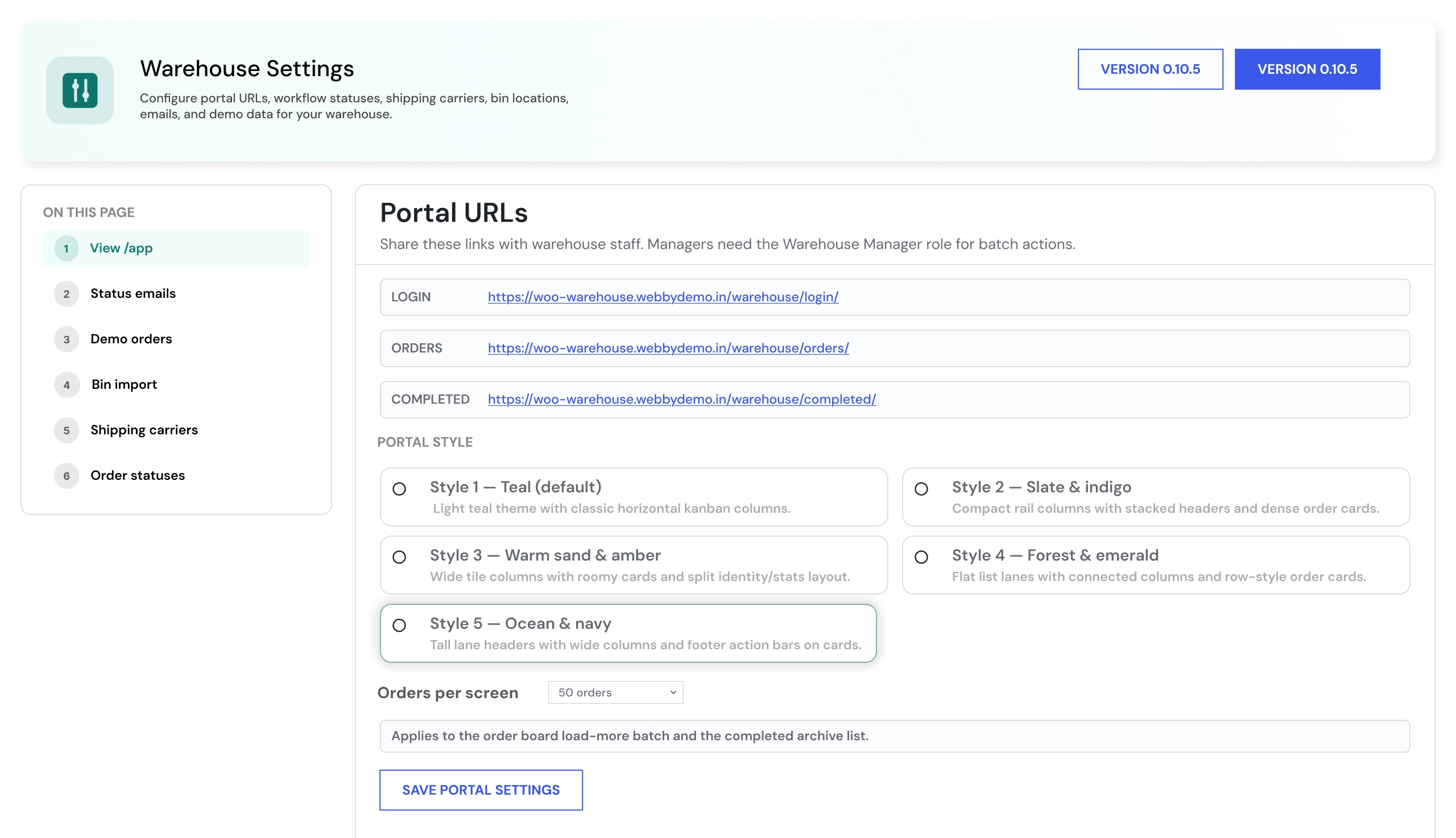
The configuration covers:
- Warehouse workflow statuses
- Status labels and colors
- Fulfillment-stage order
- Picking, packing, shipping, and completion flow
- Warehouse staff roles
- Picker assignment controls
- Picker-specific order visibility
- Frontend warehouse staff portal access
- Portal themes
- Orders-per-page configuration
- Product aisle, shelf, and bin-location details
- Bin-location CSV imports
- Sample CSV download templates
- Barcode-scanning workflow
- Bin-location validation rules
- Shipping carrier configuration
- Tracking-number fields
- Tracking URL templates
- Customer notification behavior
- Order status history
- Fulfillment activity logs
- Dummy-order generation for workflow testing
- Order-level fulfillment settings
- Live warehouse-board access
How to Set Up WooCommerce Multi Warehouse Plugin
01
Install and Activate the Plugin
Install WooCommerce Multi Warehouse Plugin in a compatible WordPress and WooCommerce environment.
Result: Warehouse fulfillment settings, staff controls, and workflow tools become available.
Result: Warehouse fulfillment settings, staff controls, and workflow tools become available.
02
Create Warehouse Workflow Stages
Create custom fulfillment stages that match your process, such as Picking, Packing, Ready to Ship, Shipped, and Complete.
Result: Orders can move through a structured warehouse workflow.
Result: Orders can move through a structured warehouse workflow.
03
Add Warehouse Staff and Picker Roles
Create warehouse staff accounts, configure their role permissions, and define which orders they can access.
Result: Pickers and warehouse staff can work with the orders assigned to them.
Result: Pickers and warehouse staff can work with the orders assigned to them.
04
Configure Product Bin Locations
Add aisle, shelf, and bin details to products, or import product locations through CSV.
Result: Pickers can identify where products are stored before beginning warehouse tasks.
Result: Pickers can identify where products are stored before beginning warehouse tasks.
05
Configure Shipping Details
Add shipping carriers, tracking URL templates, notification behavior, and shipment-related settings.
Result: Teams can add tracking details during the fulfillment process.
Result: Teams can add tracking details during the fulfillment process.
06
Configure the Staff Portal
Choose the portal theme, configure orders per page, and review frontend staff access.
Result: Warehouse users can process assigned orders without full WordPress admin access.
Result: Warehouse users can process assigned orders without full WordPress admin access.
07
Test Fulfillment Workflow
Test status movement, picker assignment, barcode scanning, bin validation, tracking details, customer notifications, and completed-order history on staging.
Result: Your warehouse process is ready for day-to-day WooCommerce fulfillment operations.
Result: Your warehouse process is ready for day-to-day WooCommerce fulfillment operations.
Who Is This Plugin For?
This plugin is suitable for:
- WooCommerce stores processing a growing number of daily orders
- Online retailers with warehouse staff handling picking and packing
- Businesses that need a visual order-fulfillment workflow
- Stores assigning orders to specific pickers
- Teams using barcode scanning during warehouse picking
- Retailers that need aisle, shelf, and bin-location information
- Businesses that want shipping tracking managed during fulfillment
- Store owners who need a dedicated warehouse staff portal
- Agencies building fulfillment workflows for WooCommerce clients
- Developers customizing WooCommerce order-processing operations
This plugin is not suitable for businesses that need multi-location inventory quantities, stock allocation by warehouse, warehouse-based shipping-rate calculation, automatic order routing by stock location, or a complete WMS with procurement, replenishment, and stock forecasting.
Changelog
v19.0.0 — Initial Release
- - Initial release with warehouse fulfillment board
- - Custom workflow statuses
- - Picker assignment
- - Barcode scanning
- - Bin-location management
- - Staff portal
- - Shipping-tracking workflow
- - Order-history tracking.
Customers Reviews
See what store owners are saying about performance and results.
What is WooCommerce Multi Warehouse Plugin?
WooCommerce Multi Warehouse Plugin is a WooCommerce warehouse fulfillment solution for managing picking, packing, shipping, picker assignments, barcode scanning, bin locations, staff portal access, tracking details, workflow stages, and order-history activity.
Does this plugin manage stock by warehouse?
No. The plugin focuses on warehouse order fulfillment, staff workflows, product bin locations, and order processing. It does not allocate stock quantities by warehouse, track inventory levels at multiple locations, or automatically route orders based on warehouse stock.
Can I create custom warehouse workflow stages?
Yes. Administrators can create, edit, color-code, and reorder workflow statuses to match the warehouse process. Typical stages can include Picking, Packing, Ready to Ship, Shipped, and Complete.
Can warehouse staff access orders without WordPress admin access?
Yes. The plugin includes a dedicated frontend warehouse staff portal where authorized users can access relevant orders without receiving full WordPress admin access.
Can I assign orders to specific pickers?
Yes. Orders can be assigned to specific warehouse staff members. Picker visibility controls help ensure staff work with orders relevant to their assigned tasks.
Does the plugin support barcode scanning?
Yes. Warehouse staff can scan product barcodes during picking to support product verification and more structured fulfillment workflows.
Can I store product bin locations?
Yes. You can add aisle, shelf, and bin details for products. The plugin also supports CSV import for managing bin-location information in bulk.
Can I import product bin locations through CSV?
Yes. Product bin locations can be imported through CSV, and sample CSV templates are available to help prepare import files.
Does the plugin support shipping tracking?
Yes. Administrators can configure carriers, add tracking numbers, define tracking URL templates, and trigger customer notifications during the fulfillment workflow.
Can I view order fulfillment history?
Yes. The plugin tracks order-status changes, records who updated an order, stores previous and new statuses, and keeps timestamps for warehouse workflow actions.
Does it work with WooCommerce checkout?
Yes. The plugin works with existing WooCommerce orders after customers complete checkout. Payment gateways, taxes, shipping methods, and checkout behavior remain controlled by your existing WooCommerce configuration.
Be the first to review “WooCommerce Multi Warehouse Plugin - Order Fulfillment, Bin Locations & Staff Portal”