Built by WebbyCrown Solutions — Need setup, customization, or integration help? Talk to our team.



eTimeOffice Integration
Availability
❌ Odoo Online
✅ Odoo.sh
✅ On Premise
Product Version
19.0
$17.12

eTimeOffice Integration for Odoo - Attendance Sync, Punch Data API & HR Mirror
What Is eTimeOffice Integration?
HR teams using eTimeOffice for biometric or cloud-based time tracking face a manual process to get attendance data into Odoo. Punch records - daily check-ins, check-outs, and work times - need to be manually reconciled with Odoo HR attendance, creating data delays, reconciliation errors, and unreliable inputs for payroll, leave, and reporting workflows.
eTimeOffice Integration connects Odoo directly to the eTimeOffice cloud API and syncs employee punch data into structured daily attendance records automatically. HR teams configure credentials once from General Settings, schedule automatic syncs at hourly, daily, weekly, or monthly intervals, and map eTimeOffice employee codes to Odoo employee records - no coding required. Punch data flows into dedicated daily attendance records and optionally mirrors into standard hr.attendance for full Odoo workflow compatibility.
Key Benefits

Central API Configuration
Manage all eTimeOffice credentials, sync settings, and frequency from a single card in Odoo General Settings - no scattered configuration.

Flexible Sync Scheduling
Set hourly, daily, weekly, or monthly automatic sync - exactly one matching cron job activates per selected frequency with automatic deactivation of others.

Full Sync Visibility with Logs
Every sync run records its trigger source, outcome, duration, and processed record count so HR and IT teams can audit and troubleshoot without guesswork.

Accurate Employee Mapping
Map Odoo employees to eTimeOffice user codes so every synced punch attaches to the correct hr.employee record automatically.

HR-ReadyAttendance Data
Daily attendance records with IN/OUT punches are optionally mirrored to standard hr.attendance to support native Odoo attendance reports and workflows.

Manual Control and Testing
Test API credentials, run a manual sync with a specific date range, or trigger a test sync without waiting for the scheduled cron job.
Modules & Features
Centralize API Configuration in Settings
Manage all eTimeOffice integration settings from a single Settings card without scattered configuration.
- Enable or disable the integration at any time using the Active toggle in General Settings
- Store Corporate ID, Username, and Password securely in the eTimeOffice settings card
- Reference the eTimeOffice API URL in a read-only field - no manual entry needed
- Configure sync frequency directly from the same General Settings card
- View the last successful sync timestamp on the same screen for quick status confirmation
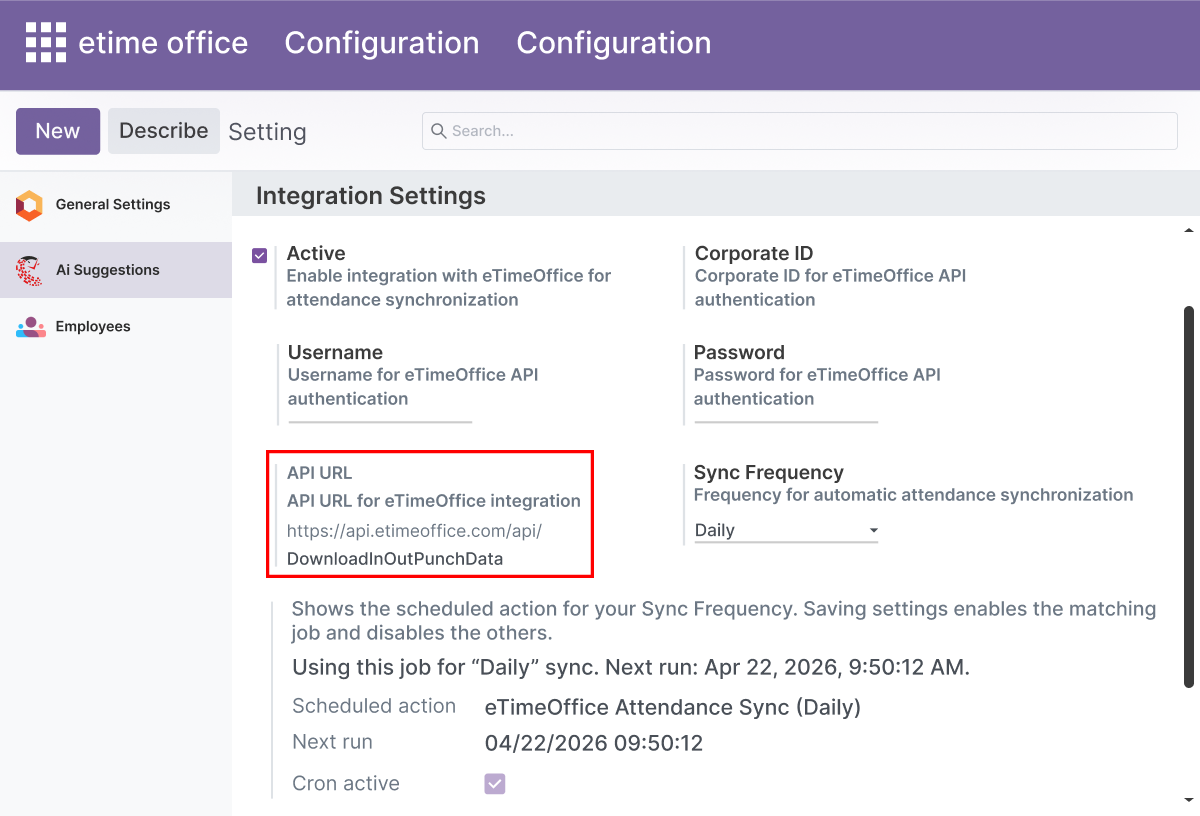
Flexible Sync Frequency Scheduling
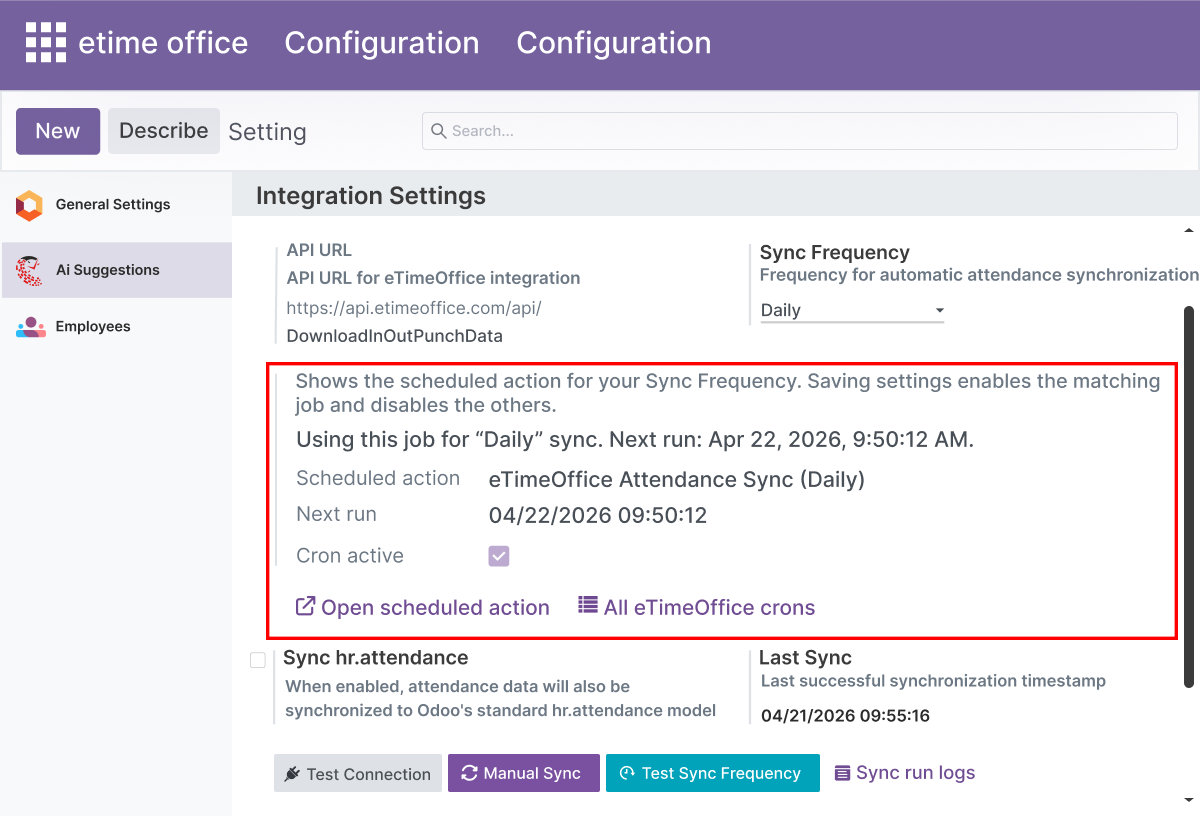
Allow administrators to align attendance sync with operational needs.
- Select hourly, daily, weekly, or monthly sync frequency from the settings card
- Exactly one matching cron job activates per selected frequency
- Other eTimeOffice cron jobs disable automatically when the frequency setting changes
- Open the active scheduled action directly from the settings screen to review or adjust it
- View next run time and scheduled sync status in read-only fields without leaving settings
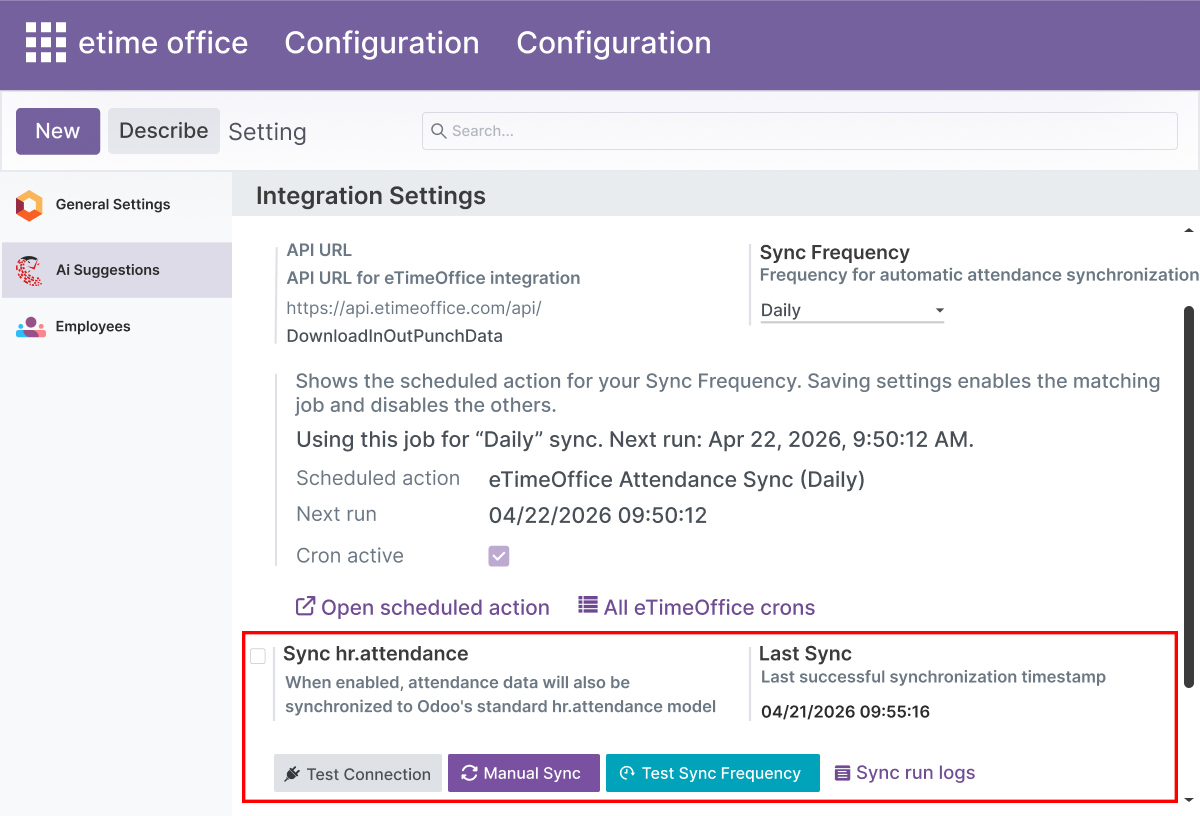
Manual Sync and Connection Testing
Give administrators full control over on-demand sync operations.
- Use the Test Connection action to verify Corporate ID, Username, and Password before going live
- Run a manual sync wizard with a specific employee code and date range for targeted data pulls
- Trigger a test sync run to validate the scheduler setup without waiting for the next cron cycle
- Reduce dependency on automatic cron timing for ad-hoc or urgent data needs
- Catch credential or configuration issues before they affect daily attendance operations
Employee Code Mapping forAccurate Attribution
Link Odoo employees to eTimeOffice user codes for consistent record alignment.
- Set the eTimeOffice employee code on each Odoo employee record from the employee form
- Attach synced punch records to the correct hr.employee automatically based on the mapped code
- Maintain a dedicated eTimeOffice user list pulled directly from the API
- Map API users to Odoo employees from a single screen in the eTimeOffice menu
- Reduce mismatched or unattributed attendance records caused by missing or incorrect employee links
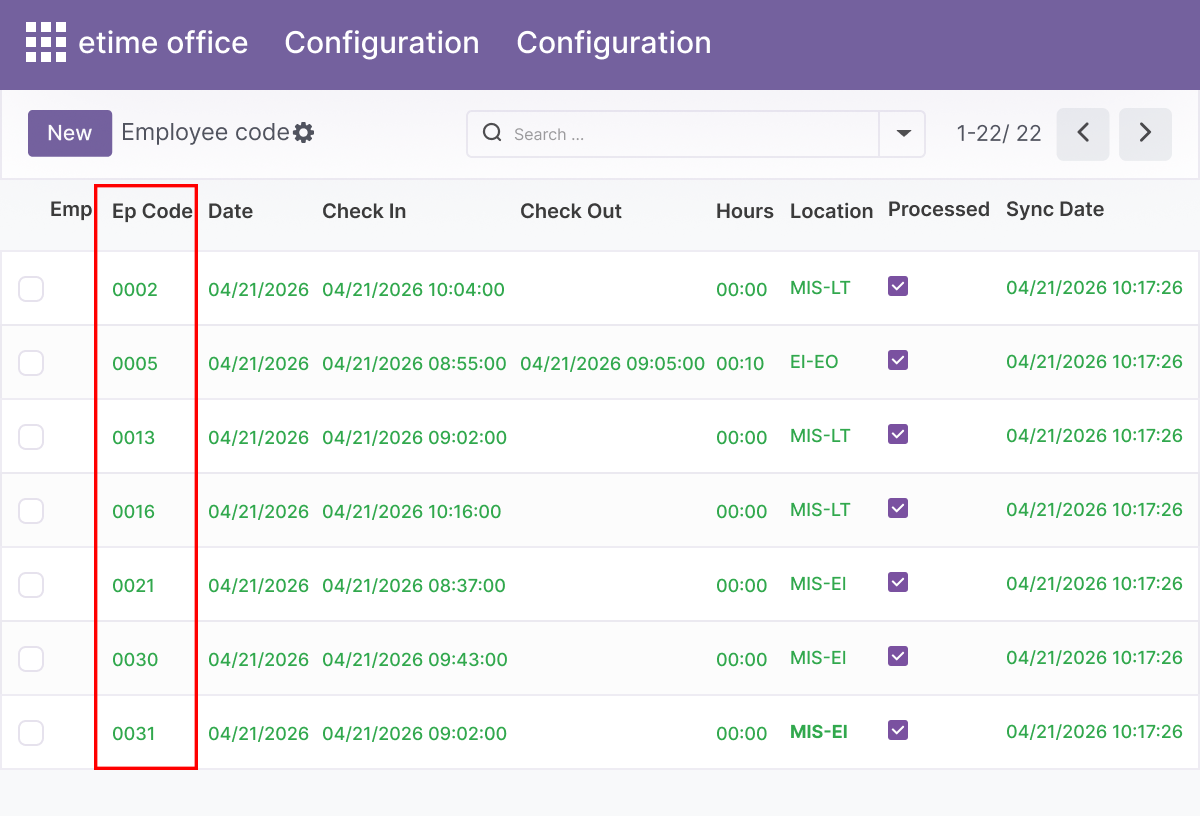
DailyAttendance Records
Store one structured attendance record per user per day for clean reporting.
- Store one structured attendance record per eTimeOffice user per day - no duplicate daily rows
- Capture daily IN and OUT punch times from the synced eTimeOffice data
- Compute work time automatically based on the synced IN and OUT punch values
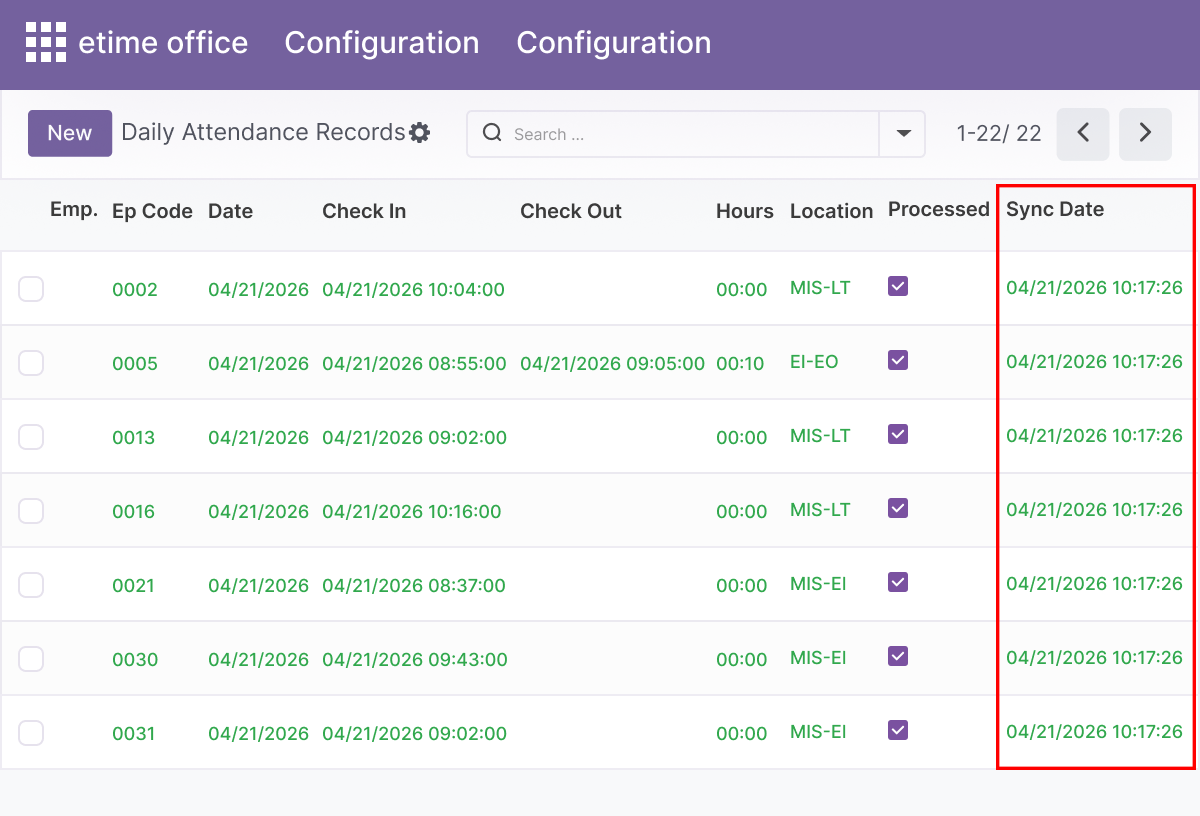
- Convert punch datetimes from IST to UTC automatically during sync
- Make daily attendance records available for HR analysis, reporting, and audit
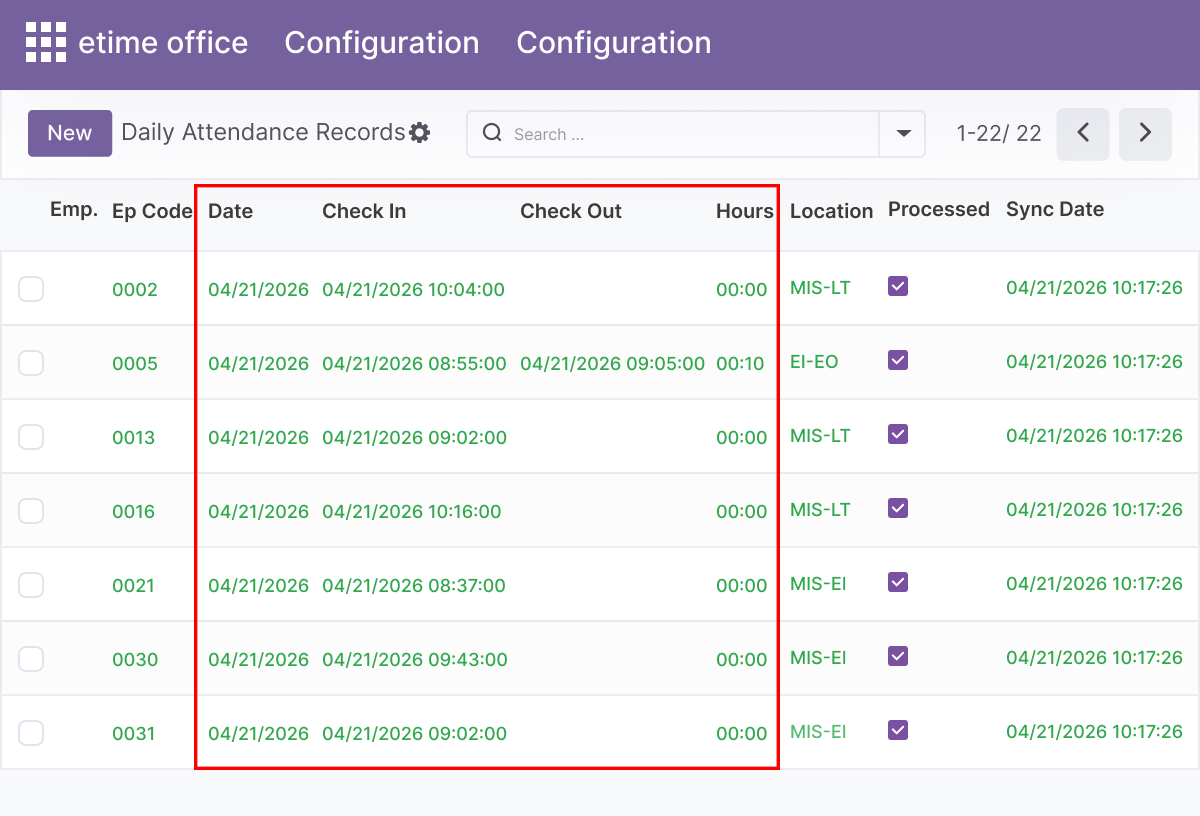
Optional hr.attendance Mirror Sync
Keep standard Odoo attendance workflows in sync with eTimeOffice data.
- Enable the Sync hr.attendance option in the eTimeOffice settings card to activate mirroring
- Write compatible check-in and check-out times to the standard hr.attendance model
- Support standard Odoo attendance reports, leave integration, and native HR workflows
- Limit mirroring to employees who are linked through eTimeOffice code mapping
- Keep eTimeOffice daily records and Odoo hr.attendance consistent without manual reconciliation
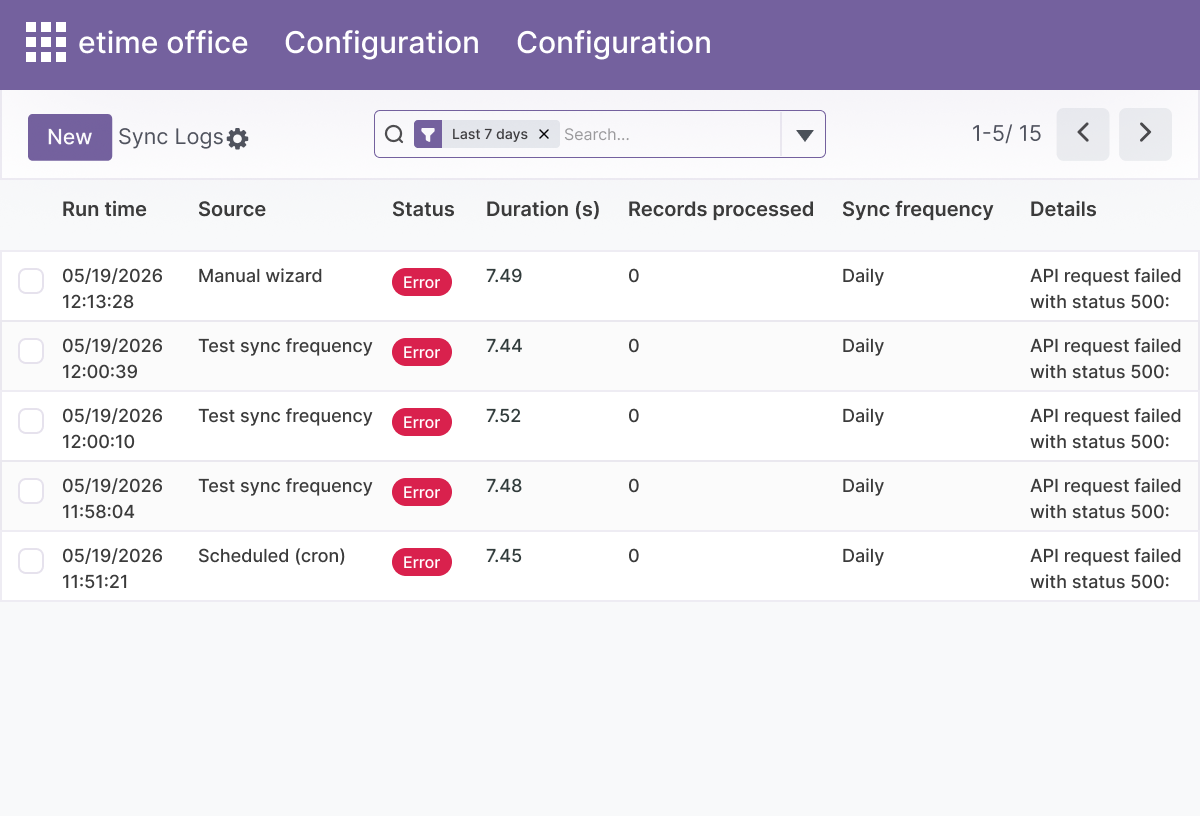
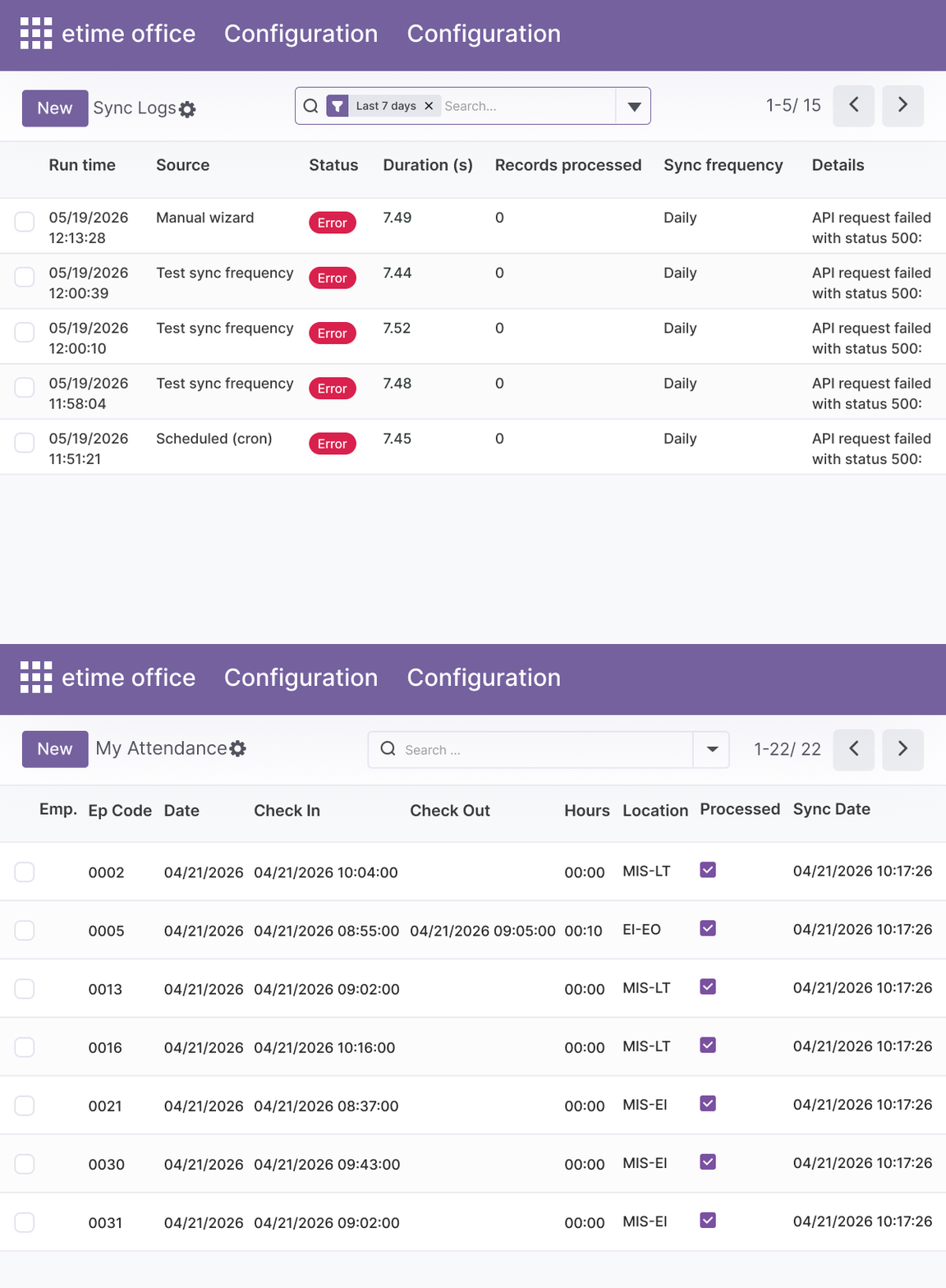
Comprehensive Sync Run Logs
Monitor and audit every sync execution from a central log view.
- Record trigger source for every sync run: cron, manual, test, or API
- Capture outcome per run: success, error, or skipped - with no ambiguity
- Track duration and processed record counts for each individual run
- Review full historical sync activity from a central log view for troubleshooting
- Give HR and IT teams clear operational visibility into every data transfer event
Dedicated eTimeOffice Menus
Provide a clean navigation structure for administrators and users.
- A dedicated eTimeOffice root menu in Odoo keeps all features separate from native HR menus
- Access Configuration and Users under the Operations submenu
- Access Attendance Records under Operations to view and manage daily punch data
- My Attendance menu available for users assigned to the eTimeOffice User security group
- Improves discoverability and navigation for both administrators and end users
Role-Based Security Groups
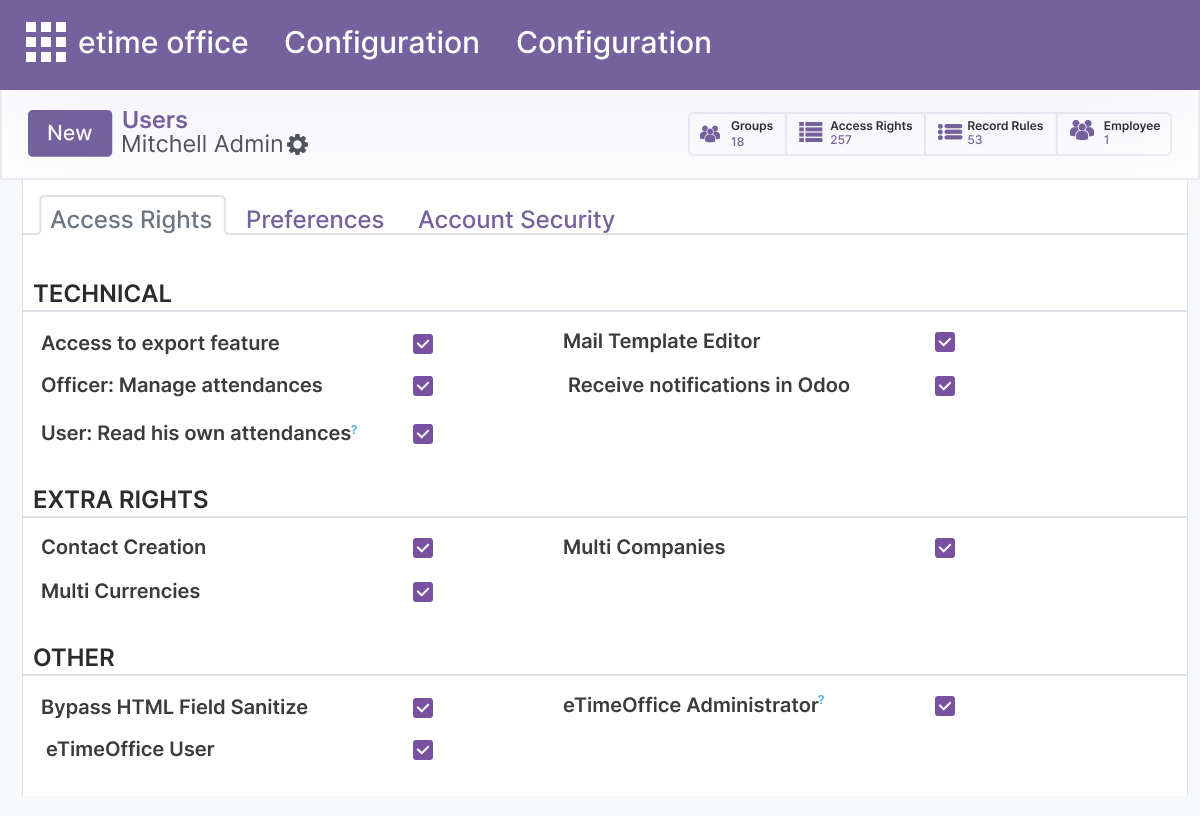
Control access to eTimeOffice features with two dedicated security groups.
- eTimeOffice Administrator group provides full access to configuration, settings, and all records
- eTimeOffice User group provides access to personal attendance records only
- Sensitive API credentials and sync settings are restricted to the Administrator group
- Employees in the User group can view only their own attendance records
- Aligns access permissions with HR and IT governance requirements
Lightweight HTTP Integration with Retries
Connect to the eTimeOffice API with a focused, minimal technical footprint.
- Uses Basic authentication built from Corporate ID, Username, and Password for each API call
- Calls the eTimeOffice DownloadInOutPunchData endpoint to retrieve punch records
- Applies HTTP retries through a shared helper module to handle transient API failures
- Parses InOutPunchData JSON responses into structured daily attendance records
- Dependencies limited to base, hr, hr_attendance, mail, and the external requests library
Advanced Settings and Configuration
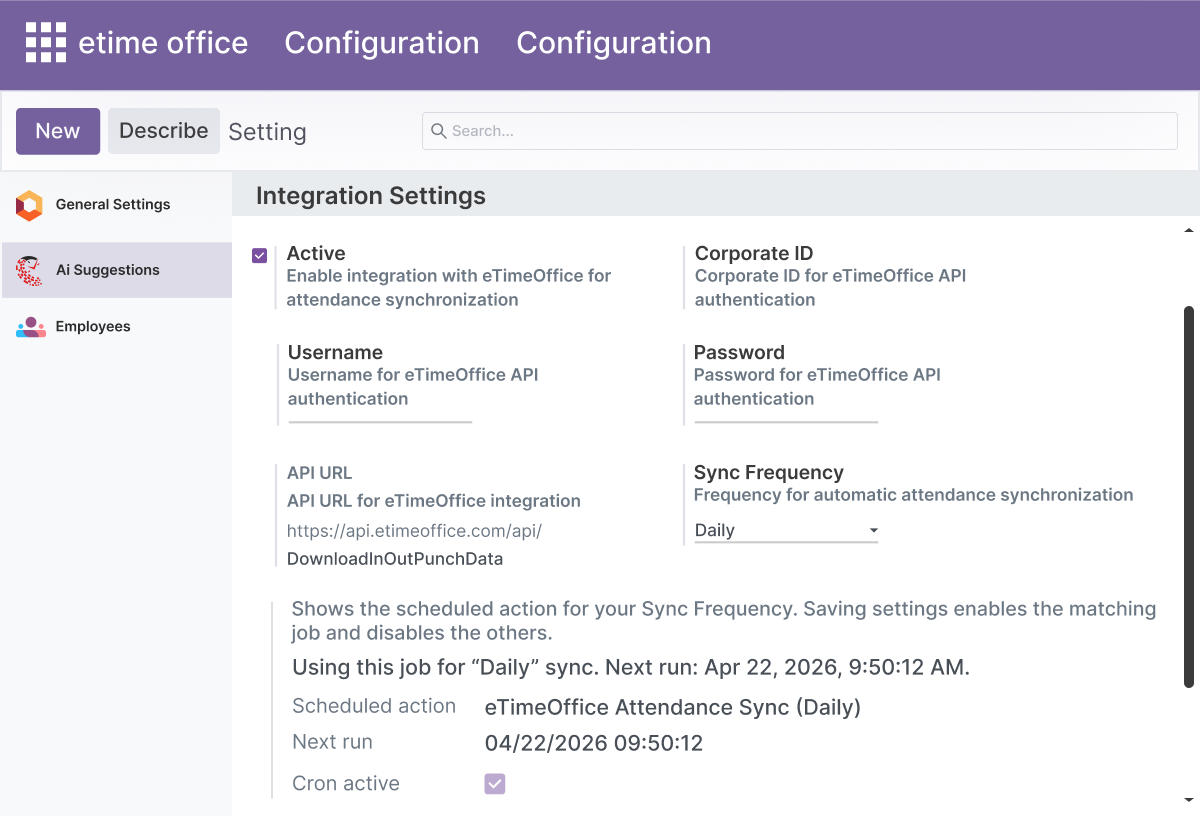
All eTimeOffice settings are managed from Settings → General Settings → eTimeOffice card. Administrators configure every option - from API credentials and sync frequency to hr.attendance mirroring - without code changes.
The settings card covers:
- Active toggle - enable or disable the integration
- Corporate ID, Username, and Password - API authentication
- eTimeOffice API URL - read-only reference field
- Sync frequency - hourly, daily, weekly, or monthly
- Sync hr.attendance - enable optional mirroring to standard attendance
- Last sync timestamp - read-only status field
- Active scheduled action link - view or adjust the cron job directly
How to Set Up eTimeOffice Integration
01
Install the App
Install eTimeOffice Integration in your Odoo.sh or On Premise environment.
Result: The eTimeOffice menu and settings card appear in Odoo.
Result: The eTimeOffice menu and settings card appear in Odoo.
02
Configure API Credentials
Go to Settings → General Settings → eTimeOffice card. Enter your Corporate ID, Username, Password, and select your sync frequency.
Result: API credentials are saved and the matching cron job activates.
Result: API credentials are saved and the matching cron job activates.
03
Map Employee Codes
Go to the eTimeOffice menu → Users. Map each eTimeOffice API user to the correct Odoo employee using the employee code field.
Result: Synced punch records will attach to the correct employees.
Result: Synced punch records will attach to the correct employees.
04
Test the Connection
From Settings → General Settings → eTimeOffice card, click Test Connection.
Result: A confirmation confirms credentials are valid and the API is reachable.
Result: A confirmation confirms credentials are valid and the API is reachable.
05
Run Your First Sync
Use the Manual Sync wizard with a date range, or wait for the scheduled cron job to run. Check Sync Logs for the outcome.
Result: Daily attendance records appear in eTimeOffice → Attendance Records.
Result: Daily attendance records appear in eTimeOffice → Attendance Records.
Who Is This App For?
- HR managers handling attendance data from eTimeOffice biometric or cloud time tracking systems
- Payroll teams who need accurate daily punch records in Odoo without manual imports
- Odoo administrators integrating eTimeOffice data into HR and payroll workflows
- IT teams managing Odoo.sh or On Premise environments with eTimeOffice
- Odoo implementation partners setting up HR attendance integrations for clients
- Organizations using eTimeOffice for time tracking and Odoo for HR, payroll, or reporting
This app does not support Odoo Online deployments. It requires Odoo.sh or On Premise. It is also not suitable for attendance devices not connected to the eTimeOffice cloud API.
Changelog
v19.0.0 — Initial Release
- – Added eTimeOffice settings card with credentials and sync frequency
- – Implemented hourly, daily, weekly, and monthly cron jobs
- – Added Test Connection, Manual Sync wizard, and Test Sync Frequency actions
- – Implemented employee code mapping and eTimeOffice user list
- – Added daily attendance records with IN/OUT punches and work time calculation
- – Implemented optional hr.attendance mirror for mapped employees
- – Added sync run logs with trigger source, outcome, duration, and record counts
- – Implemented dedicated eTimeOffice menu structure
- – Added Administrator and User security groups
- – Implemented IST to UTC conversion and HTTP retries
What does eTimeOffice Integration do in Odoo?
It connects Odoo to the eTimeOffice cloud API and automatically syncs employee punch data into structured daily attendance records. HR teams get accurate IN/OUT times, computed work time, sync logs, and the option to mirror data into standard hr.attendance - all configured from General Settings without coding.
Does this app work on Odoo Online?
No. eTimeOffice Integration requires Odoo.sh or On Premise deployment. Odoo Online is not supported.
Which Odoo versions are supported?
The app supports Odoo 14.0, 15.0, 16.0, 17.0, 18.0, and 19.0.
How do I connect Odoo to eTimeOffice?
Go to Settings → General Settings → eTimeOffice card. Enter your Corporate ID, Username, and Password, select your sync frequency, and click Test Connection to verify. Once confirmed, the integration is active and syncing on the selected schedule.
Can I sync attendance automatically on a schedule?
Yes. Select hourly, daily, weekly, or monthly sync frequency from the settings card. Exactly one matching cron job activates per selected frequency, and other eTimeOffice cron jobs deactivate automatically when the frequency changes.
Can I run a manual sync for a specific date range?
Yes. Use the Manual Sync wizard from the settings card. Enter the employee code and the date range you need. This is useful for backfilling missed sync periods or verifying specific records without waiting for the cron job.
Does it work with standard Odoo attendance reports?
Yes, optionally. Enable the Sync hr.attendance option in settings to mirror synced punch data into the standard hr.attendance model. This makes eTimeOffice data available in native Odoo attendance reports and leave-related workflows.
How are employees matched between Odoo and eTimeOffice?
Each Odoo employee record has an eTimeOffice employee code field. Set the code that matches the employee's record in the eTimeOffice API. Synced punch data attaches to the correct Odoo employee based on this mapping. Unmatched records are skipped.
What information do the sync logs capture?
Each log entry records the trigger source (cron, manual, test, orAPI), outcome (success, error, or skipped), duration of the sync run, and the number of records processed. Logs are available in a central view for troubleshooting and audit.
Is this suitable for Odoo implementation partners?
Yes. Partners and agencies can use this app to deliver a complete eTimeOffice-toOdoo attendance integration for clients running Odoo.sh or On Premise, including configuring employee mappings, sync schedules, and sync log monitoring as part of an HR implementation.