Built by WebbyCrown Solutions — Need setup, customization, or integration help? Talk to our team.



Odoo Advanced Data Export – CSV, Excel, JSON, API & Scheduled Exports
Availability
❌ Odoo Online
✅ Odoo.sh
✅ On Premise
Product Version
19.0
$57.08


Odoo Advanced Export Module - Bulk Data Export, Scheduled Export & Multi-Format Delivery
What Is Odoo Advanced Export Pro?
Odoo's built-in export tool is limited to the current list view, selected records, and a fixed set of fields. Teams that need to export from multiple models, schedule recurring exports, deliver files to cloud storage or external APIs, or process large datasets in the background have no native way to do this without custom development or manual workarounds.
Odoo Advanced Export Pro gives teams a single module to export data from any standard or custom Odoo model to CSV, Excel, XML, JSON, TSV, PDF, and ODS - with smart field selection, filter rules, data preview, scheduled cron jobs, batch processing, and delivery to Google Drive, Dropbox, AWS S3, FTP/SFTP, RESTAPIs, or PostgreSQL. Exports run in the background, every run is logged with full statistics, and access is controlled by user group - no coding required.
Key Benefits

Export From Any Odoo Model
Export from any standard or custom Odoo model using one bulk data tool - no separate configuration needed per module.

Multi-Format Output
Export to CSV, Excel (.xlsx), XML, JSON, TSV, PDF, and ODS with format-specific configuration including encoding and date formatting.

Automated Scheduled Exports
Run daily, weekly, monthly, or custom cron-scheduled exports automatically with background job execution.

Multiple Delivery Methods
Deliver exports by direct download, email, RESTAPI, FTP/SFTP, Google Drive, Dropbox, AWS S3, or write directly to PostgreSQL.

Smart Filtering and Preview
Apply filter rules with AND/OR logic, preview matching records, and validate data before any file is generated.

Export Logging and Templates
Save reusable export templates and track every run with logs, history dashboards, and statistics by date, model, and delivery method.
Modules & Features
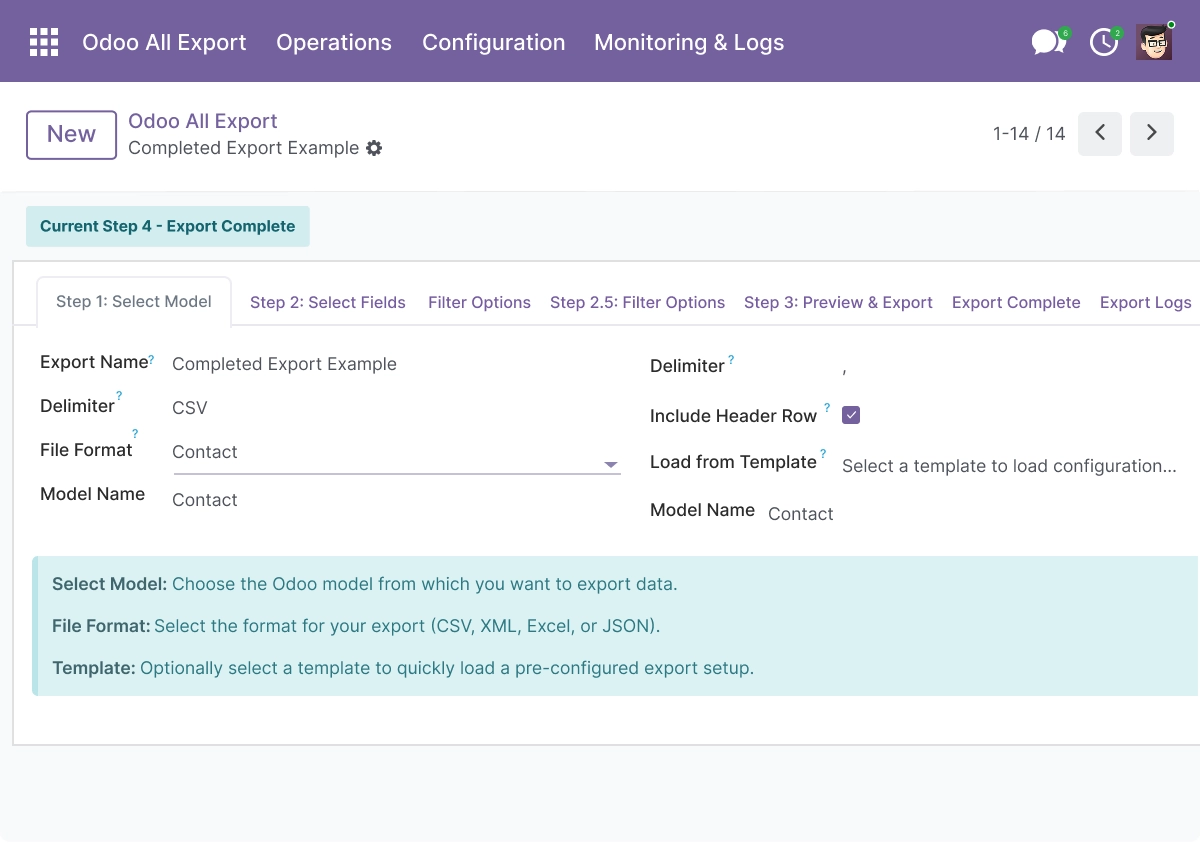
Model Selection and Format Configuration
Select any Odoo model and configure export formats in one place using the odoo advanced export module for flexible export and import workflows. The live listing supports standard and custom Odoo models, with format options for CSV, XML, Excel, JSON, TSV, PDF, and ODS.
- Select any Odoo model - standard or custom - as the export source from one screen
- Export to CSV, XML, Excel (.xlsx), JSON, TSV, PDF, and ODS from a single export configuration
- Configure date, number, and null value formatting for clean, consistent output files
- Set file encoding - UTF-8, ISO-8859-1, Windows-1252, UTF-16, orASCII - for destination compatibility
- All model and format options are accessible from one centralized export configuration interface
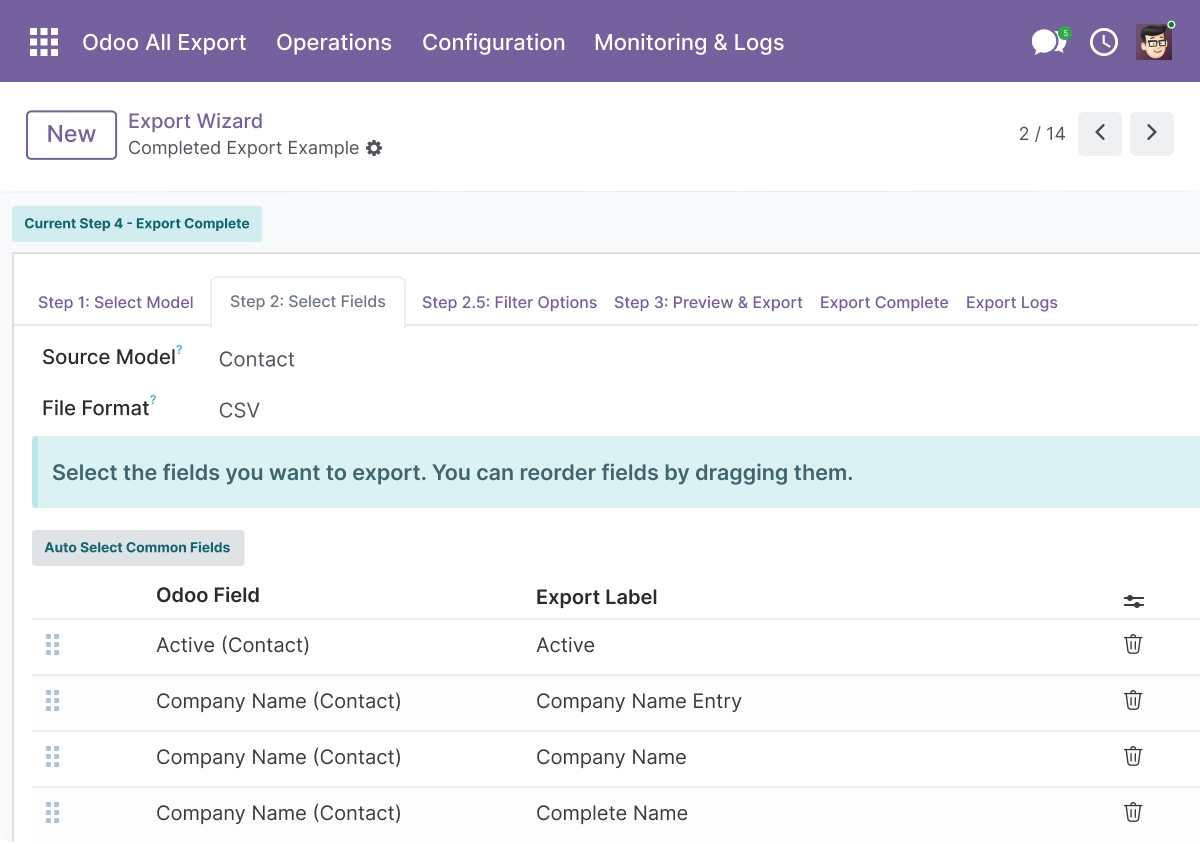
Smart Field Selection
Choose fields using automatic detection or manual selection with full control, designed for advanced odoo export module workflows. This helps users select specific fields and export valid data for reporting or import compatible export use.
- Auto-detect commonly used fields for the selected Odoo model
- Select specific fields manually or override auto-detected fields per export configuration
- Reorder fields to match the layout required by your reporting tool or import process
- Add custom field labels to replace technical field names in the output file header
- Support all Odoo field types including Many2one, One2many, and Many2many for relational data
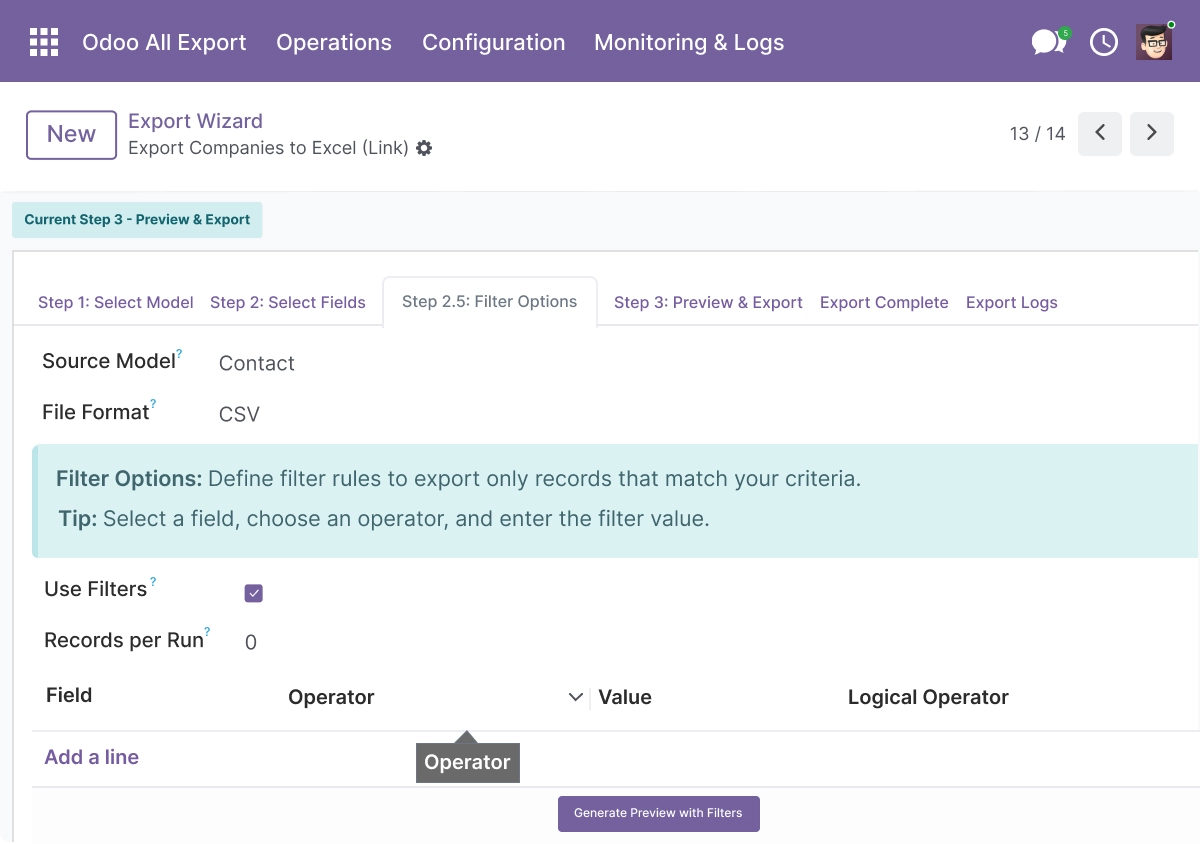
Data Filtering
Apply filters to export only relevant records using rule-based logic in the odoo advanced export module. The live listing supports multiple operators, custom rules, and AND/OR logic so users can reduce errors and export the right records.
- Apply filter rules using operators: equals, contains, greater than, less than, and more
- Combine multiple filter conditions with AND or OR logic for precise record selection
- Export only the records that match your filter - no full model dumps required
- Combine with scheduled exports to filter recurring data automatically on each run
- Reduce file size and processing time by exporting only relevant records
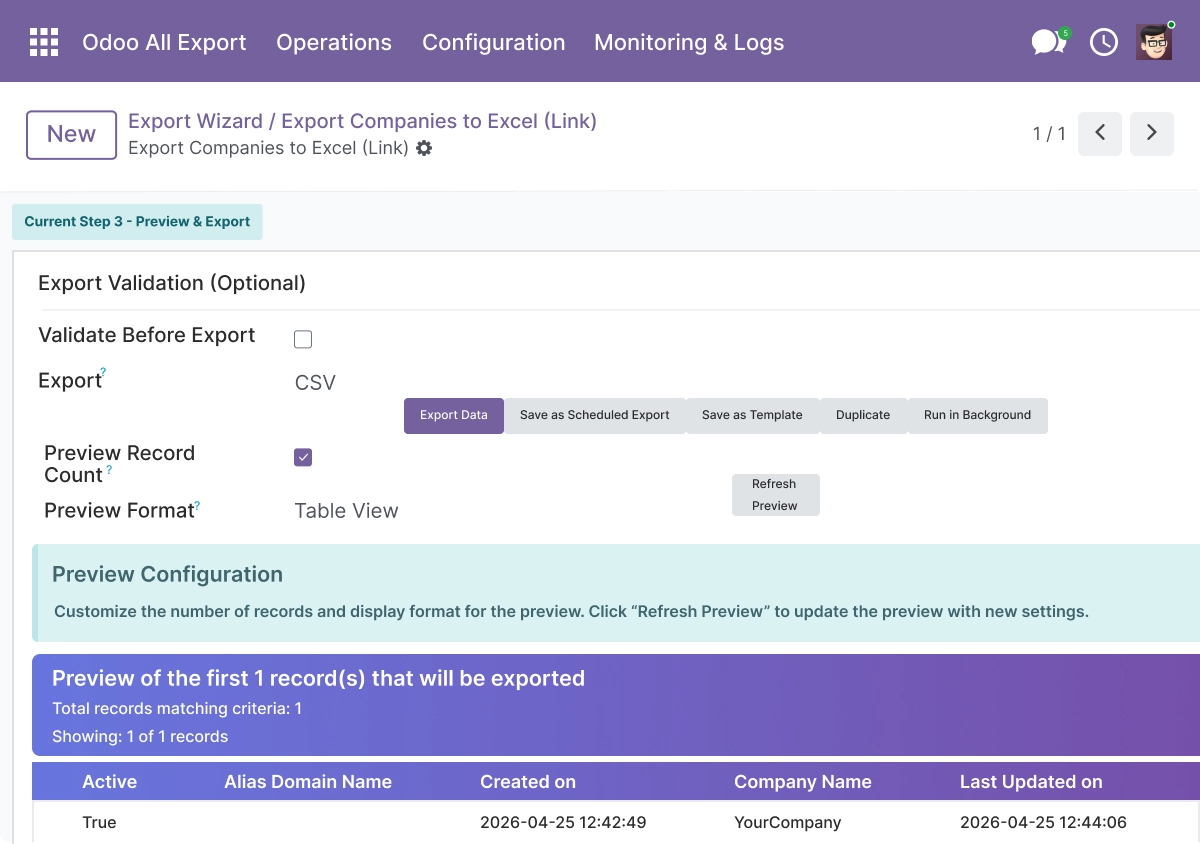
Data Preview
Preview export data before generating files to validate structure in your odoo advanced export module workflow. The live listing includes data preview and preview customization so users can explore records before export.
- Preview selected records before generating the export file
- View data in table or list format to confirm field values and structure
- Refresh the preview instantly after changing fields, filters, or format settings
- Validate field mapping and data values before committing to the export run
- Identify formatting issues or incorrect mappings early without generating a wasted file
Multiple Delivery Methods
Deliver exported files through multiple channels including API and cloud integrations using odoo export module capabilities. The live listing supports direct download, shareable link, email, REST API, FTP/SFTP, Google Drive, Dropbox, AWS S3, and PostgreSQL.
- Download the export file directly from Odoo after the run completes
- Generate a shareable link to the exported file for distribution
- Send the file by email with automation support for scheduled export runs
- Push exported data to a RESTAPI endpoint with Basic Auth, Bearer Token, orAPI Key
- Upload to Google Drive, Dropbox, AWS S3, or write directly to a PostgreSQL database
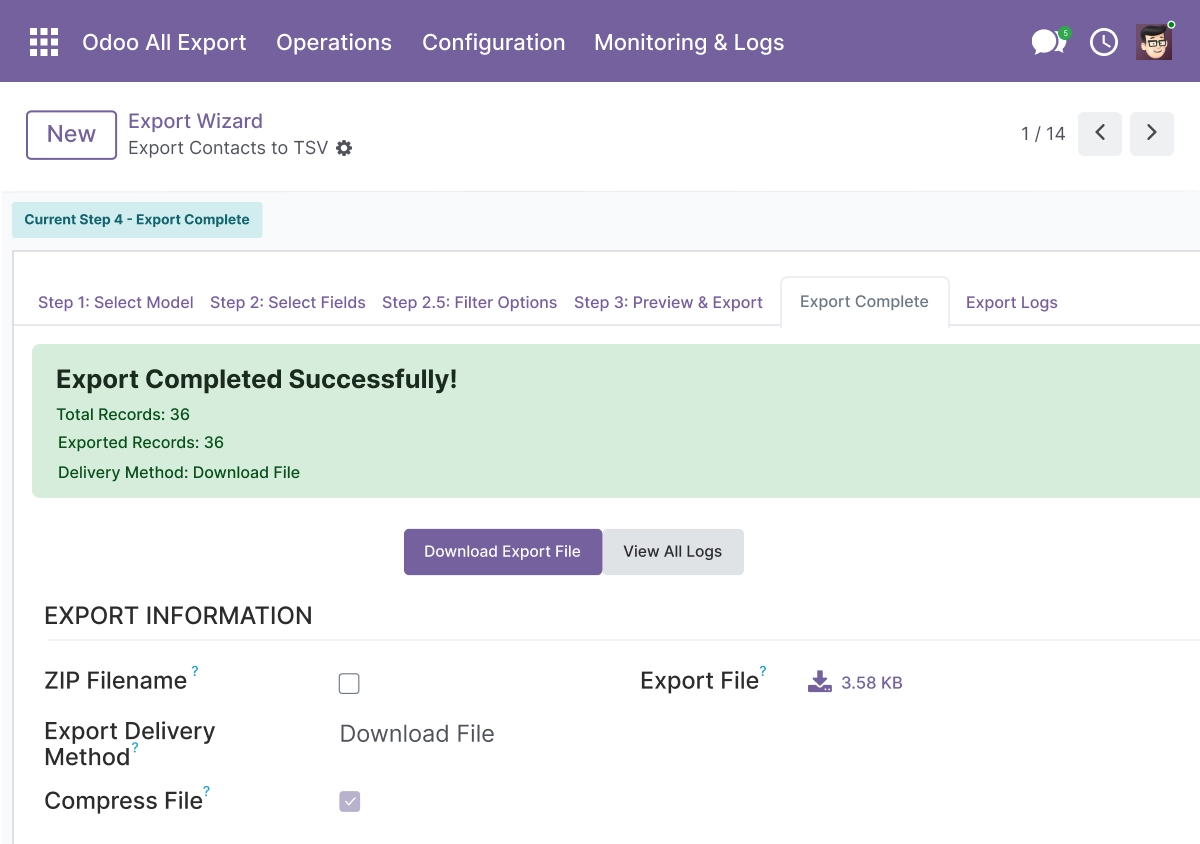
Scheduled Exports
Automate exports with the odoo scheduled export module to handle recurring data workflows. The live listing supports daily, weekly, monthly, yearly, and custom cron jobs with background jobs.
- Schedule export runs to execute daily, weekly, monthly, yearly, or as a one-time job
- Use custom cron expressions for advanced timing requirements beyond standard intervals
- Cron jobs are created and managed automatically from the export configuration - no manual setup
- Exports execute as background jobs - no manual trigger needed after the schedule is set
- Combine scheduled exports with delivery methods for fully automated data pipelines
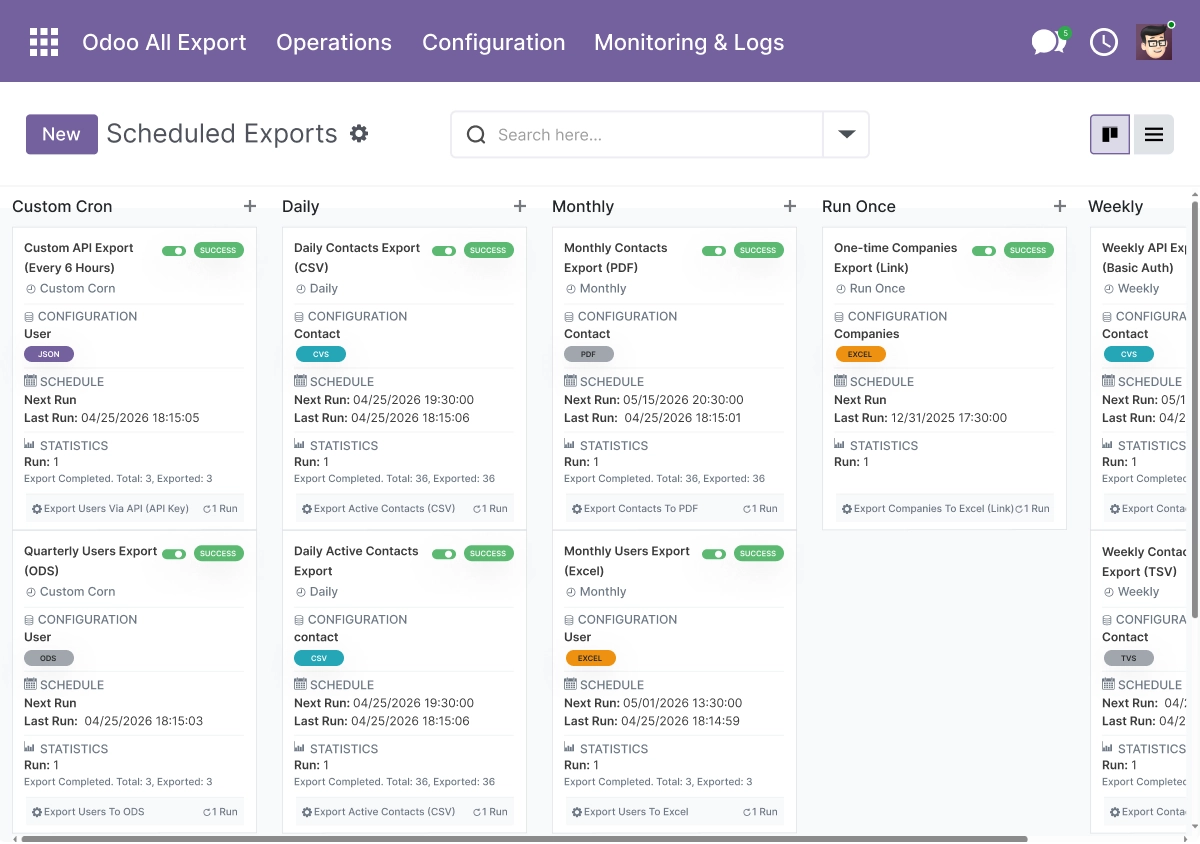
Export Templates, Logging and Statistics
Save configurations and track performance using built-in tools from the odoo advanced export module. The listing highlights export templates, duplication, export history, logs, and statistics as core features.
- Save any export configuration as a reusable template for repeated use
- Duplicate existing templates to quickly create similar exports with minor changes
- Track every export run in a log with execution result, format used, and delivery status
- View export history and statistics in graph and pivot views with filter and search support
- Filter history by date, model, format, delivery method, and status for audit and troubleshooting
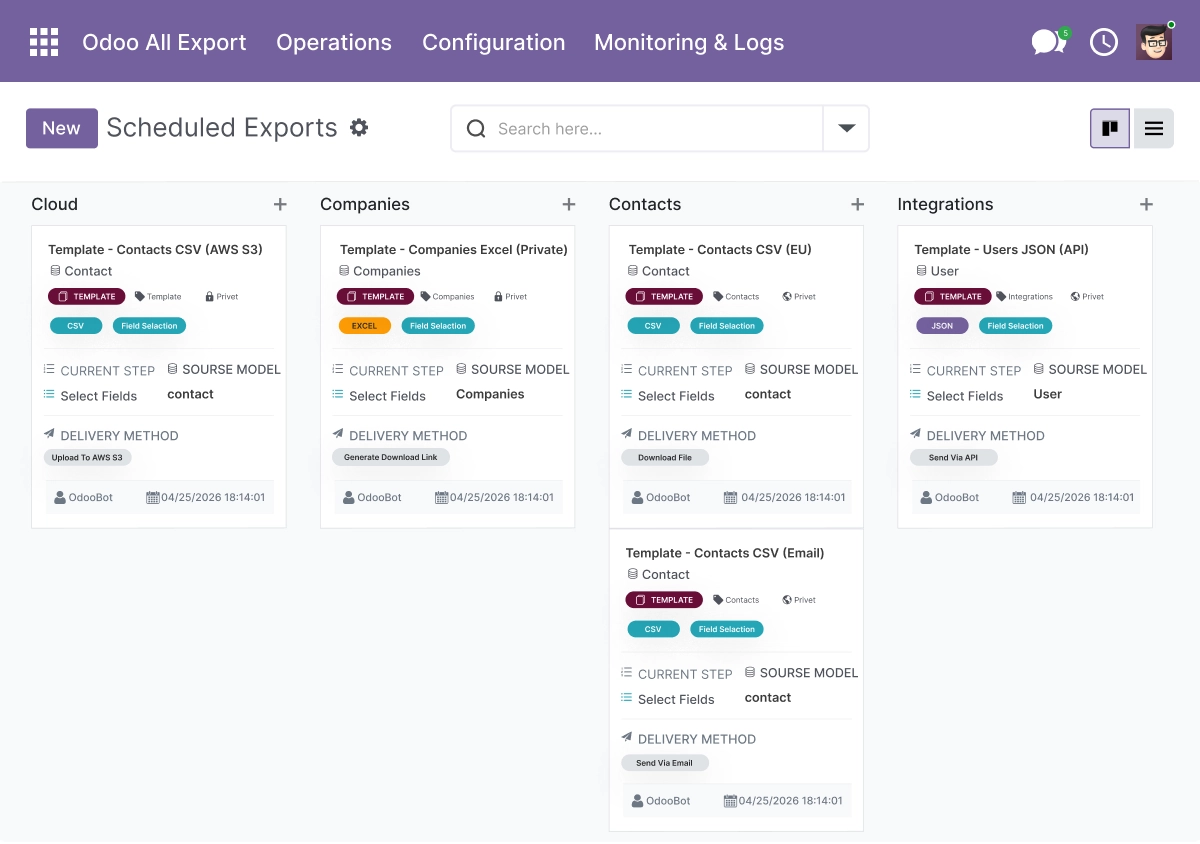
Access Control, Webhooks and Help Guide
Manage permissions and automate integrations using advanced odoo export module controls. The live page includes user access control, webhooks, and a help guide for setup and troubleshooting.
- Restrict export access by user or security group from admin settings
- Control who can create, run, and manage export configurations
- Trigger webhooks after export completion - POST requests to an external URL with export metadata
- Configure webhook authentication (Basic, Bearer Token, API Key) with custom headers and retry logic
- Use the built-in help guide for step-by-step setup instructions and troubleshooting tips
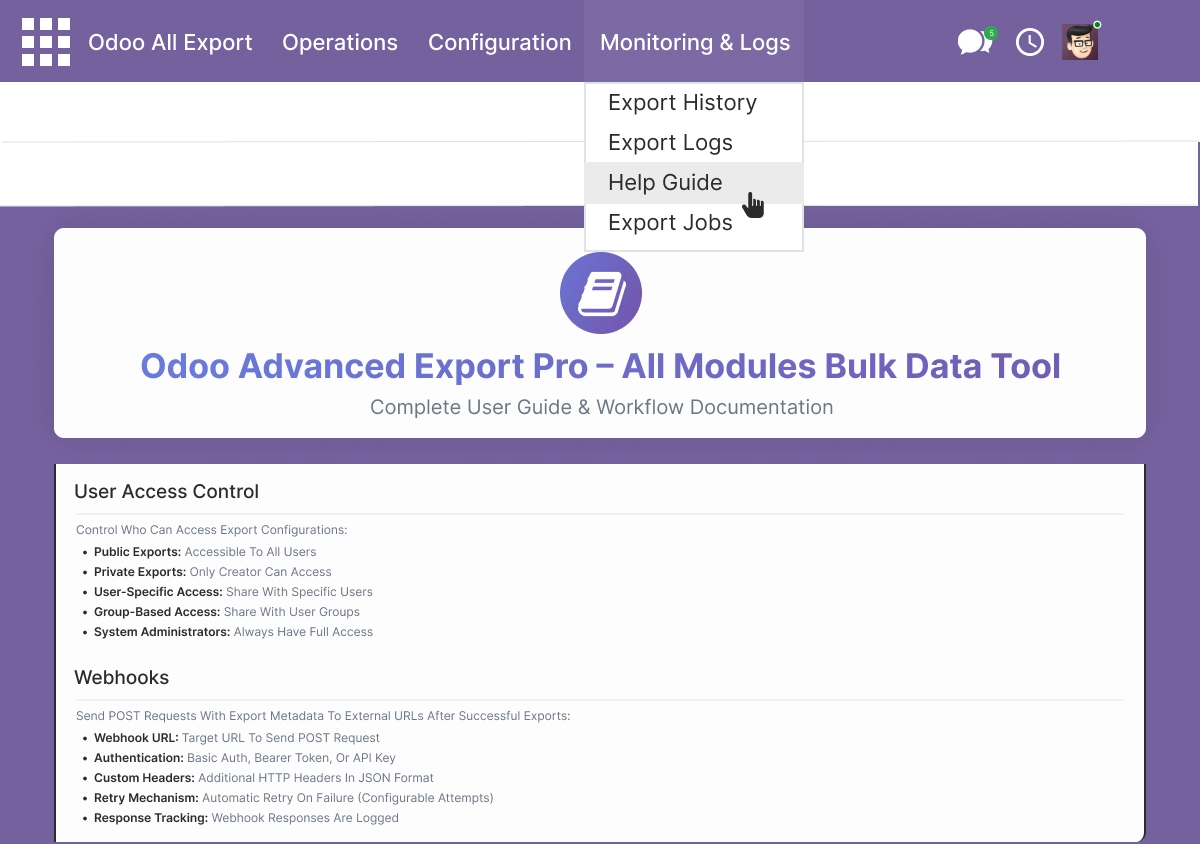
Batch Exports and File Compression
Handle large-scale exports efficiently with batch processing in the odoo advanced export module. The live listing highlights batch exports, progress tracking, and ZIP compression for large files.
- Group multiple export runs into batch jobs for efficient large-scale processing
- Track batch progress and view execution logs per individual batch job
- Compress exported files into ZIP archives with compression ratio tracking
- Queue exports as background jobs for asynchronous processing without blocking the Odoo UI
- Handle large datasets across multiple models in a single coordinated batch operation
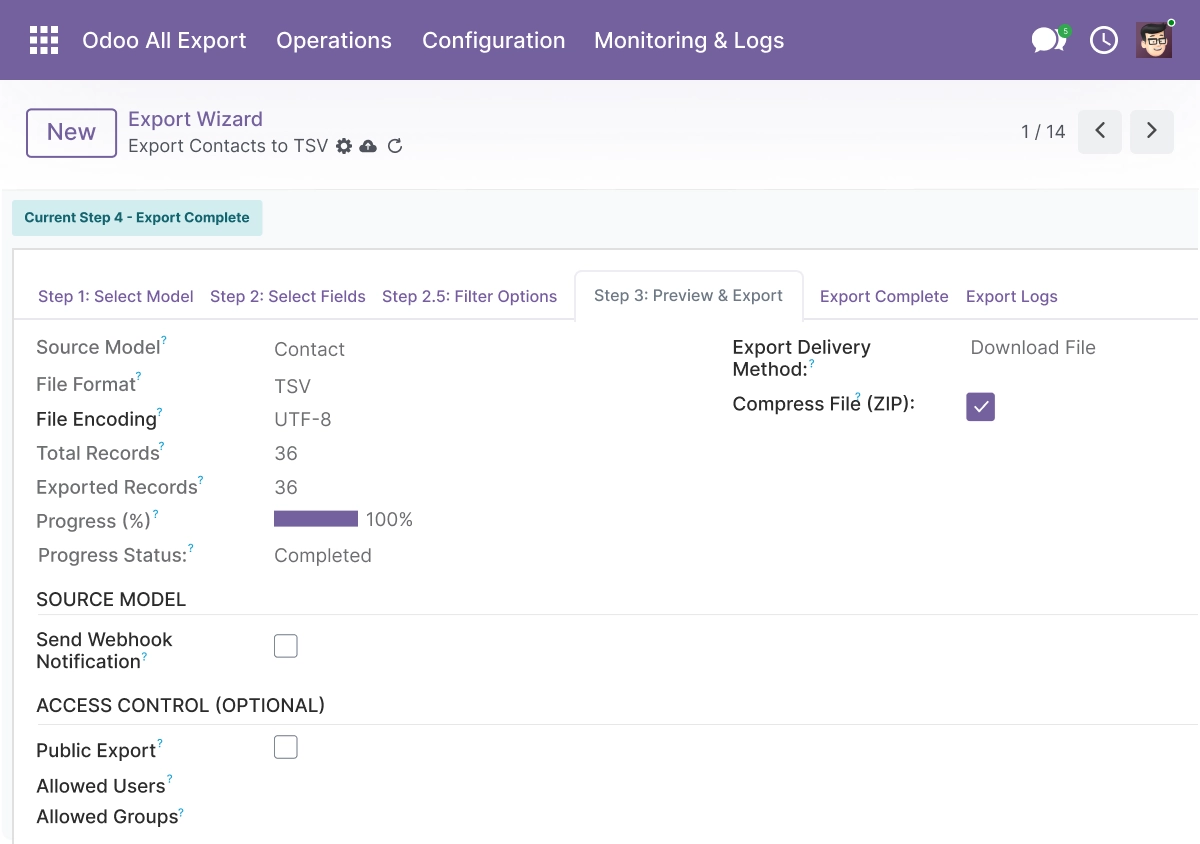
Advanced Settings and Configuration
All export configurations are managed from Advanced Export → Configurations. Administrators create and manage every aspect of an export - from model selection and field mapping to delivery method, cron schedule, access control, and webhook setup - without code changes.
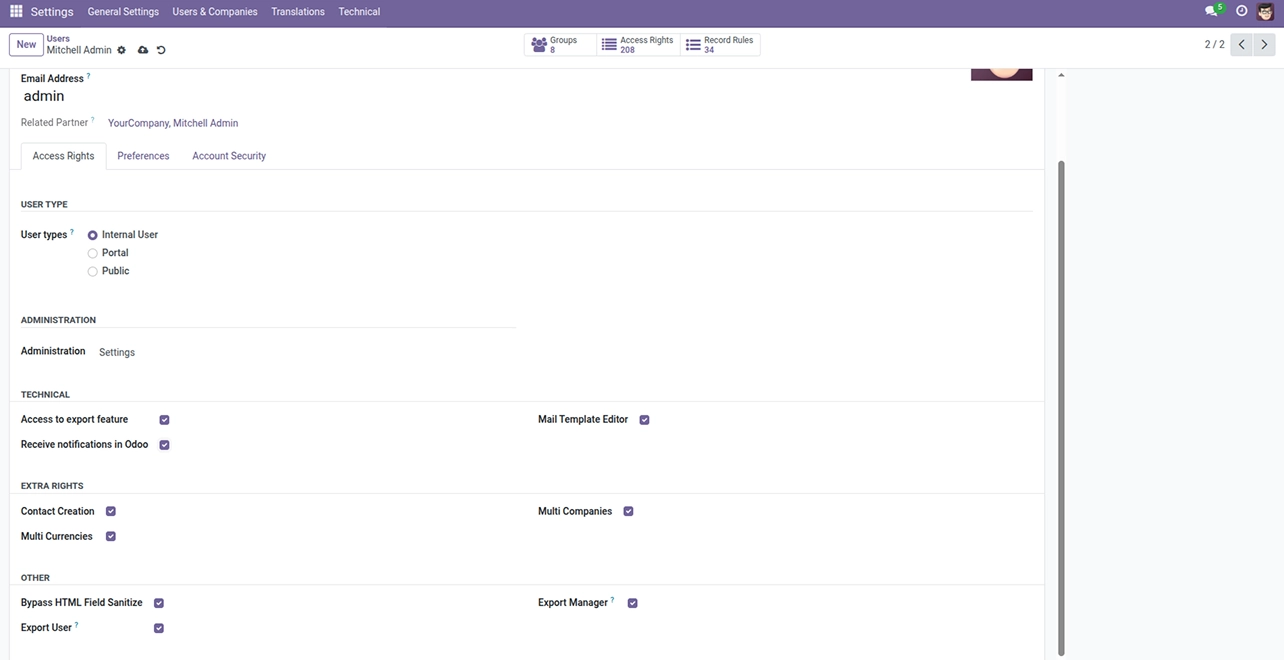
The configuration covers:
- Model selection and output format
- Field selection, reordering, and custom labels
- Filter rules with AND/OR logic
- Date, number, null value, and encoding options
- Delivery method and destination (download, email, API, FTP/SFTP, cloud, database)
- Cron schedule - daily, weekly, monthly, yearly, or custom expression
- Batch processing and background job settings
- ZIP compression options
- User access control and security group restrictions
- Webhook URL, authentication, and retry settings
- Export template creation and duplication
How to Set Up Odoo Advanced Export Pro
01
Install the App
Install Odoo Advanced Export Pro in your Odoo.sh or On Premise environment.
Result: The Advanced Export menu appears in Odoo with access to Configurations, Logs, and Templates.
Result: The Advanced Export menu appears in Odoo with access to Configurations, Logs, and Templates.
02
Create an Export Configuration
Go to Advanced Export → Configurations → New. Select the target Odoo model and choose your output format.
Result: A new export configuration is ready with model and format defined.
Result: A new export configuration is ready with model and format defined.
03
Select Fields and Apply Filters
Choose fields manually or review auto-detected fields. Add filter rules with AND/OR logic to select only the records you need.
Result: The export scope is defined - correct fields and matching records only.
Result: The export scope is defined - correct fields and matching records only.
04
Preview and Validate
Preview the first rows of the export to confirm field values, mapping, and formatting before generating the file.
Result: Data is confirmed accurate and the export is ready to run.
Result: Data is confirmed accurate and the export is ready to run.
05
Run, Schedule, or Deliver
Click Export Now for an immediate run, configure a cron schedule for recurring exports, or set a delivery destination - download, email, API, cloud storage, or database. Check Logs for the outcome.
Result: Export file is generated, delivered, and logged with full run details.
Result: Export file is generated, delivered, and logged with full run details.
Who Is This App For?
- Data and operations teams managing regular exports for reporting or data backup
- Odoo administrators automating recurring data delivery to external systems
- Finance teams exporting bank statements, invoices, sales orders, and purchase data
- IT teams delivering Odoo data to cloud storage, external APIs, or databases
- Implementation partners setting up automated export pipelines for clients
- Organizations synchronizing Odoo data with external BI tools or third-party systems
This app does not support Odoo Online. It requires Odoo.sh or On Premise.
Changelog
v19.0.0 — Initial Release
- - Added multi-format export (CSV, XML, Excel, JSON, TSV, PDF, ODS)
- - Added RESTAPI, FTP/SFTP, Google Drive, Dropbox, AWS S3, and PostgreSQL delivery
- - Added scheduled exports with cron integration
- - Added filter rules with AND/OR logic
- - Added data preview and validation
- - Added batch processing and background jobs
- - Added ZIP compression
- - Added export templates and duplication
- - Added comprehensive logging and statistics dashboards
- - Added user access control
- - Added webhook support with authentication
What does Odoo Advanced Export Pro do?
It is a bulk data export module that lets you export data from any Odoo model to CSV, Excel, XML, JSON, TSV, PDF, and ODS. It includes smart field selection, filter rules, data preview, scheduled exports, batch processing, multiple delivery methods (download, email, API, FTP/SFTP, cloud storage, database), export templates, logging, and user access control - all configured without coding.
Which file formats does it support?
The app supports CSV, Excel (.xlsx), XML, JSON, TSV, PDF, and ODS. Each format includes specific configuration options - custom delimiters for CSV, encoding selection, date and number formatting, and null value handling.
Does this app work on Odoo Online?
No. Odoo Advanced Export Pro requires Odoo.sh or On Premise deployment. Odoo Online is not supported.
Which Odoo versions are supported?
The app supports Odoo 14.0, 15.0, 16.0, 17.0, 18.0, and 19.0.
Can I export from any Odoo model?
Yes. The app supports export from any standard or custom Odoo model through a single configuration interface. Select the target model from a dropdown when creating your export configuration.
Can I schedule exports to run automatically?
Yes. Configure a daily, weekly, monthly, yearly, or one-time schedule, or use a custom cron expression. Cron jobs are created and managed automatically, and exports run as background jobs without manual triggering.
Can I send exported files to Google Drive orAWS S3?
Yes. Delivery options include Google Drive, Dropbox, AWS S3, direct download, shareable link, email, RESTAPI, FTP/SFTP, and PostgreSQL. Each delivery method is configured from the export configuration screen.
How does the logging and statistics work?
Every export run is recorded in a log with execution result, format, delivery status, and timestamp. Export history is viewable in graph and pivot views and can be filtered by date, model, format, delivery method, and status for audit and troubleshooting.
Can I restrict who can run or manage exports?
Yes. Access control is configured by user or security group from admin settings. You can restrict who can create, run, and manage export configurations, keeping sensitive data exports limited to authorized users.
Is this suitable for Odoo implementation partners?
Yes. Partners and agencies can use this app to deliver complete automated data export pipelines for clients on Odoo.sh or On Premise, including scheduled exports, cloud storage delivery, API integrations, field mapping templates, and export logging as part of an Odoo project.