Built by WebbyCrown Solutions — Need setup, customization, or integration help? Talk to our team.



Accounting Pro for Odoo
Availability
❌ Odoo Online
✅ Odoo.sh
✅ On Premise
Product Version
19.0
$34.25

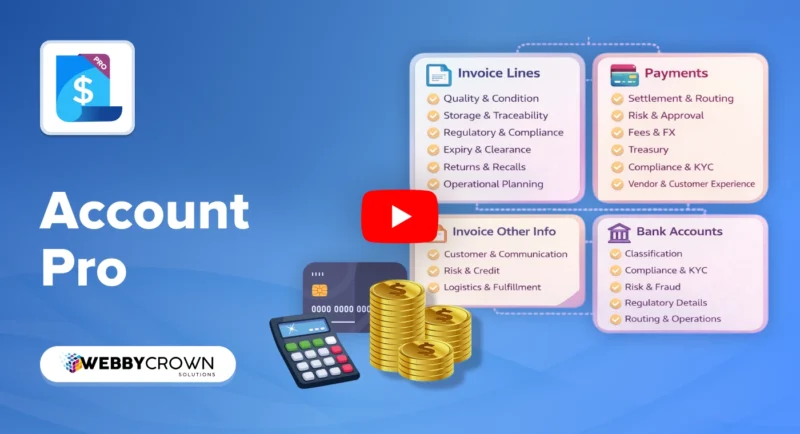
Accounting Pro Odoo - Advanced Invoices, Payments, Bank Accounts & Treasury Insights
What Is Accounting Pro for Odoo?
Finance teams using Odoo Accounting often need to capture more context on transactions than native fields allow. Quality and condition details on invoice lines, customer credit risk levels, payment routing preferences, FX contract references, treasury bucket assignments, and bank account KYC status are typically tracked in separate spreadsheets or external systems - disconnected from the accounting records where they are needed for decisions.
Accounting Pro extends Odoo Accounting models with structured fields for invoice line quality and logistics detail, customer communication profiles, credit control status, payment settlement strategies, payment risk and compliance tracking, FX and treasury tracking, and bank account classification and KYC - all on the records where finance teams already work. Native Odoo posting, reconciliation, and tax logic remain unchanged. No coding required.
Key Benefits

Single Source of Accounting Truth
Centralize invoice, payment, and bank account details in Odoo instead of relying on scattered spreadsheets or external compliance tools.

Richer Context on Every Transaction
Capture quality, logistics, risk, fees, FX, and compliance details directly on the invoices, payments, and bank accounts where decisions happen.

Stronger Treasury and Cash Insights
Use settlement strategies, treasury buckets, and liquidity priorities to plan and optimize cash movements from inside Odoo.

Improved Compliance and Risk Control
Track KYC status, credit control, fraud flags, and regulatory purpose codes on accounting records without leaving Odoo.

Analytics-Ready Data Structure
Use additional search filters and group-bys to build better reports, dashboards, and KPIs on top of native Odoo Accounting.

Non-Disruptive Extension
Extend native Accounting models with new fields without changing Odoo's posting, reconciliation, or tax logic.
Modules & Features
Invoice Line Quality and Condition Fields
Track the quality and condition of items billed on each invoice line for better accounting accuracy.
- Record quality status and check results per invoice line - visible alongside the line amount and product
- Capture item condition codes for incoming (vendor bills) and outgoing (customer invoices) flows
- Link invoice lines to quality observations for traceability on billed items
- Support audit trails on items where quality disputes arise
- Reduce unresolved disputes on damaged or non-conforming goods by capturing condition at billing time
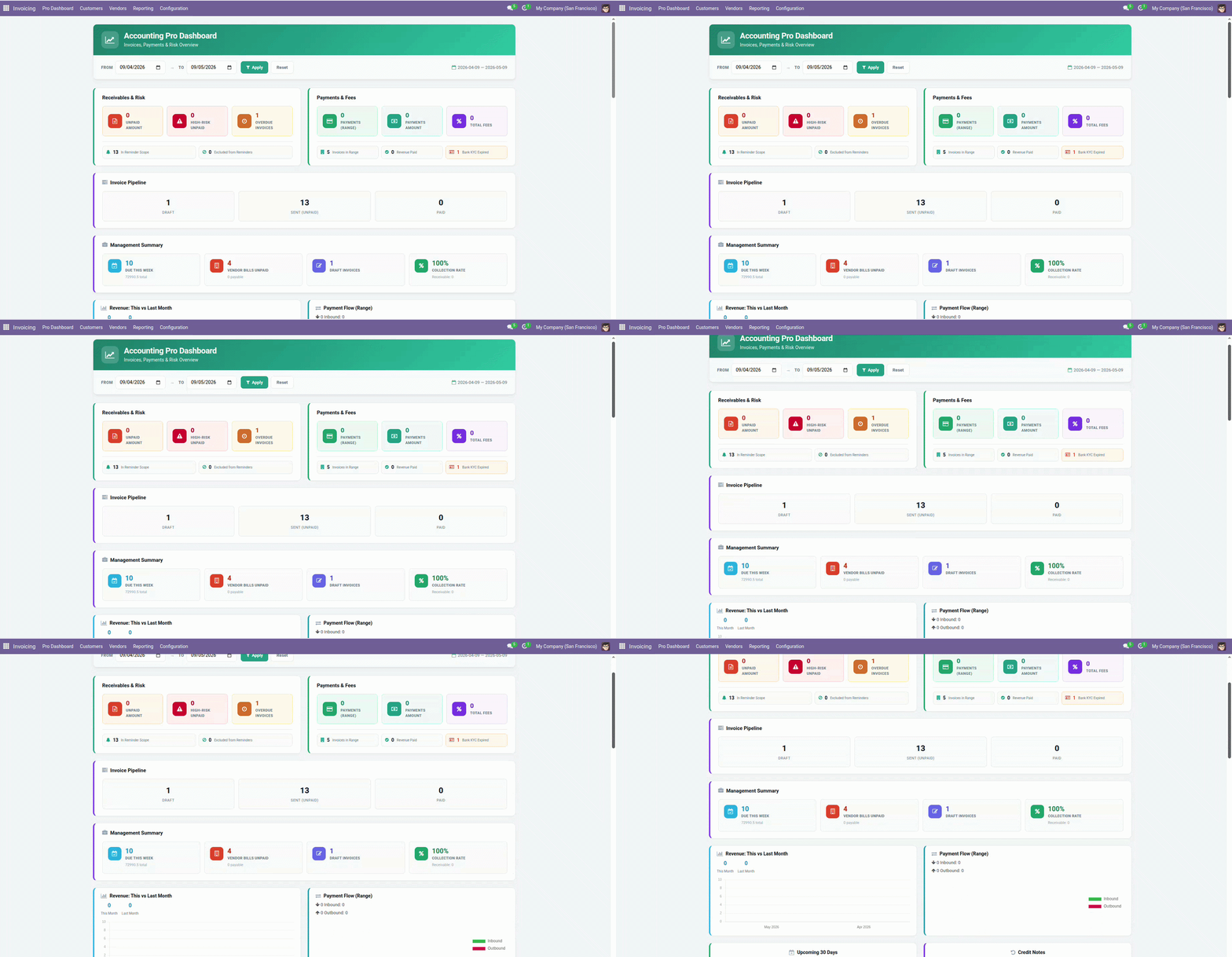
Invoice Line Storage and Traceability
Allow finance teams to access logistics details directly from the invoice line.
- Store source and destination locations on individual invoice lines for logistics context
- Capture traceability levels for billed items - batch, serial, or none - directly on the line
- Record storage requirements and handling notes relevant to the transaction
- Connect invoice line context to inventory flows without leaving the accounting record
- Improve visibility between accounting and logistics teams on the same billed transaction
Regulatory, Expiry, and Returns Tracking on Invoice Lines
Maintain regulatory and lifecycle context for billed items at line level.
- Capture regulatory flags and country of origin for billed items at line level
- Track expiry impact on invoiced items - relevant for perishable goods and regulated products
- Link returns and recall references to the invoice lines where the original billing occurred
- Support compliance with industry regulations on invoiced goods at the line level
- Reduce billing risk from items that are expired, recalled, or subject to regulatory holds
Invoice Communication Profile
Define how each invoice should be communicated to customers from a single record.
- Choose the communication channel for each invoice - email, customer portal, or SMS
- Combine multiple channels per invoice to match specific customer requirements
- Standardize customer communication behavior across invoicing teams
- Reduce missed or delayed invoice deliveries by defining the channel at the invoice record
- Align communication preferences with individual customers or customer segments
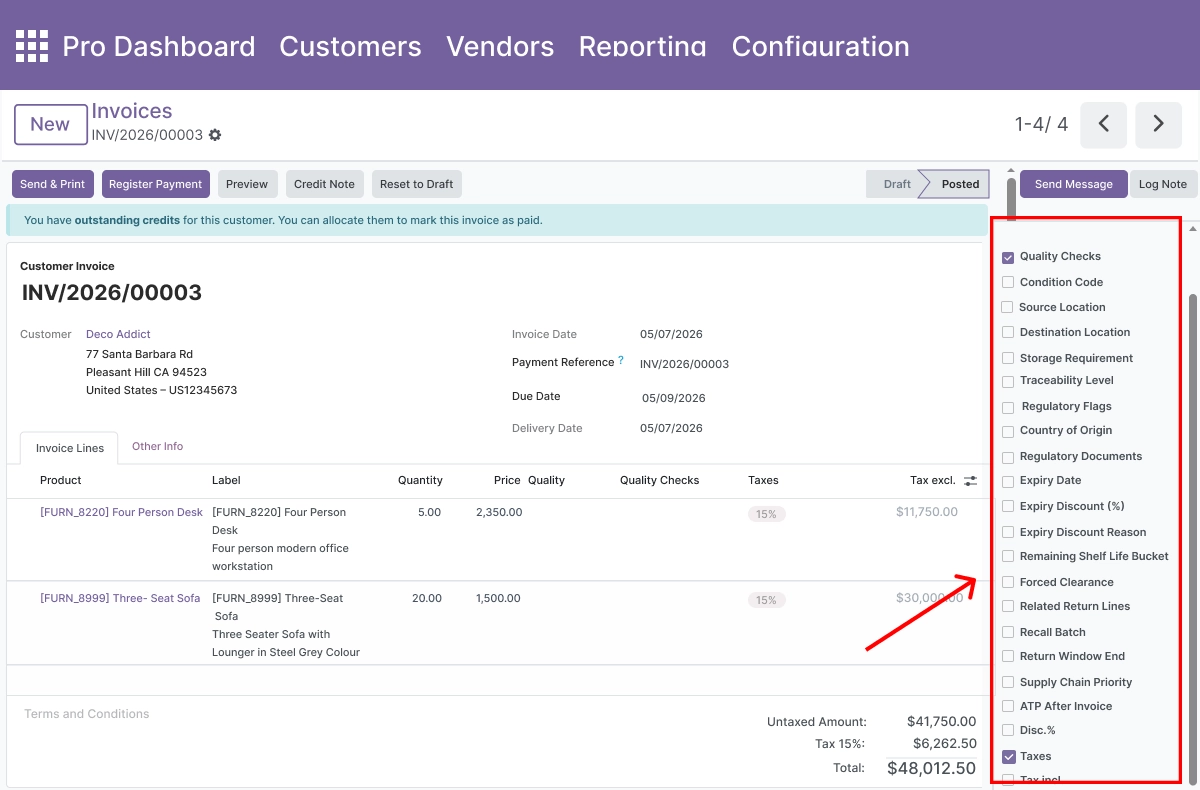
Customer Risk and Credit Control
Manage customer risk and collection strategy directly on invoices.
- Capture risk level and credit control status directly on each customer invoice
- Link invoices to collection strategies for consistent follow-up and recovery workflows
- Configure auto-reminder behavior per invoice or customer segment
- Track logistics and fulfillment constraints that affect payment and collection timelines
- Improve recovery rates on outstanding invoices with structured risk and strategy fields
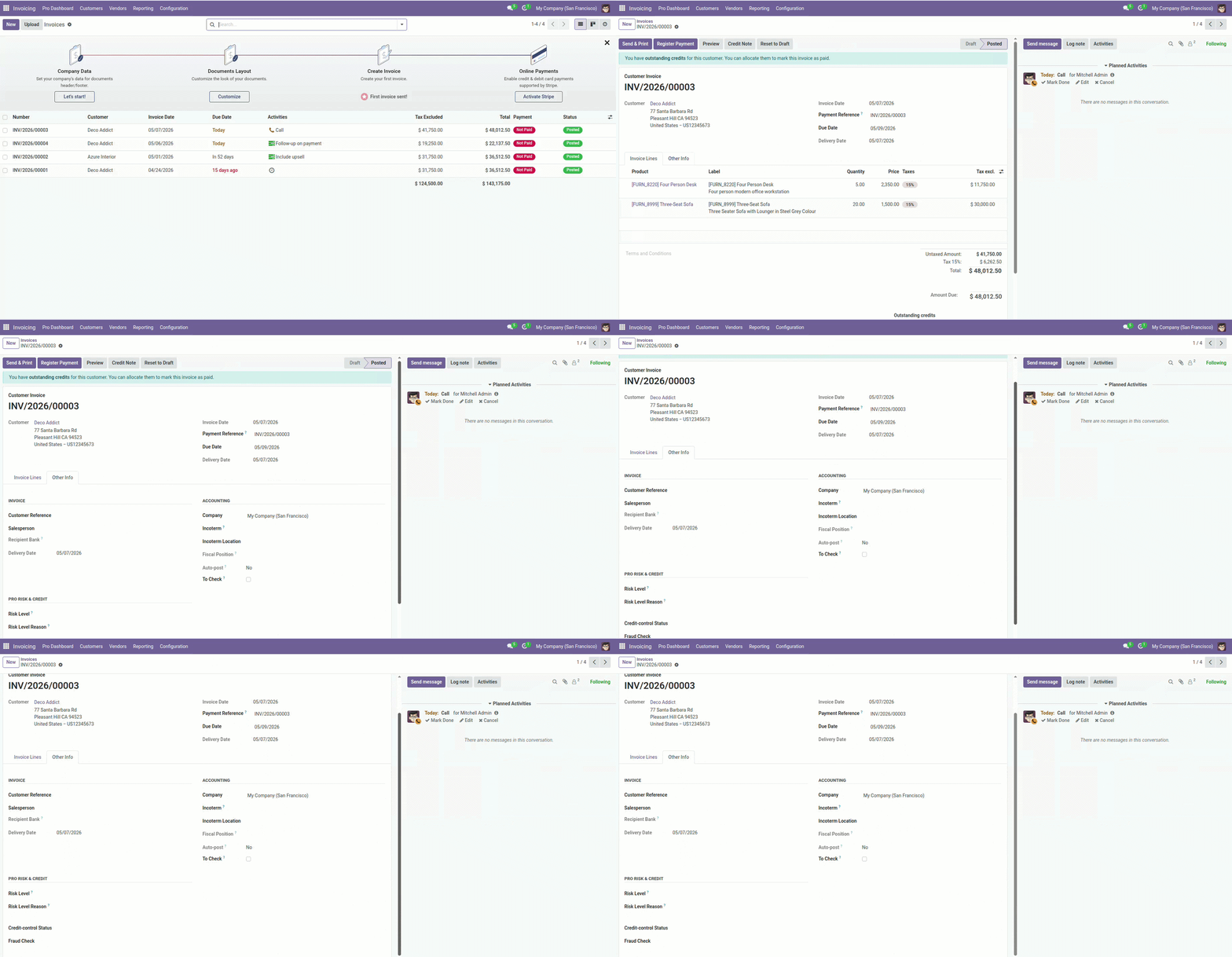
Payment Settlement and Routing
Configure how payments are settled and routed for better treasury control.
- Set a payment settlement strategy on each transaction to define how the payment is processed
- Apply routing profiles for outgoing payments based on bank, method, or counterpart
- Group payments using batch fields for coordinated payment runs
- Choose preferred payment rails per situation - SEPA, wire, internal transfer, or other
- Reduce settlement delays and routing errors with structured routing preferences per payment
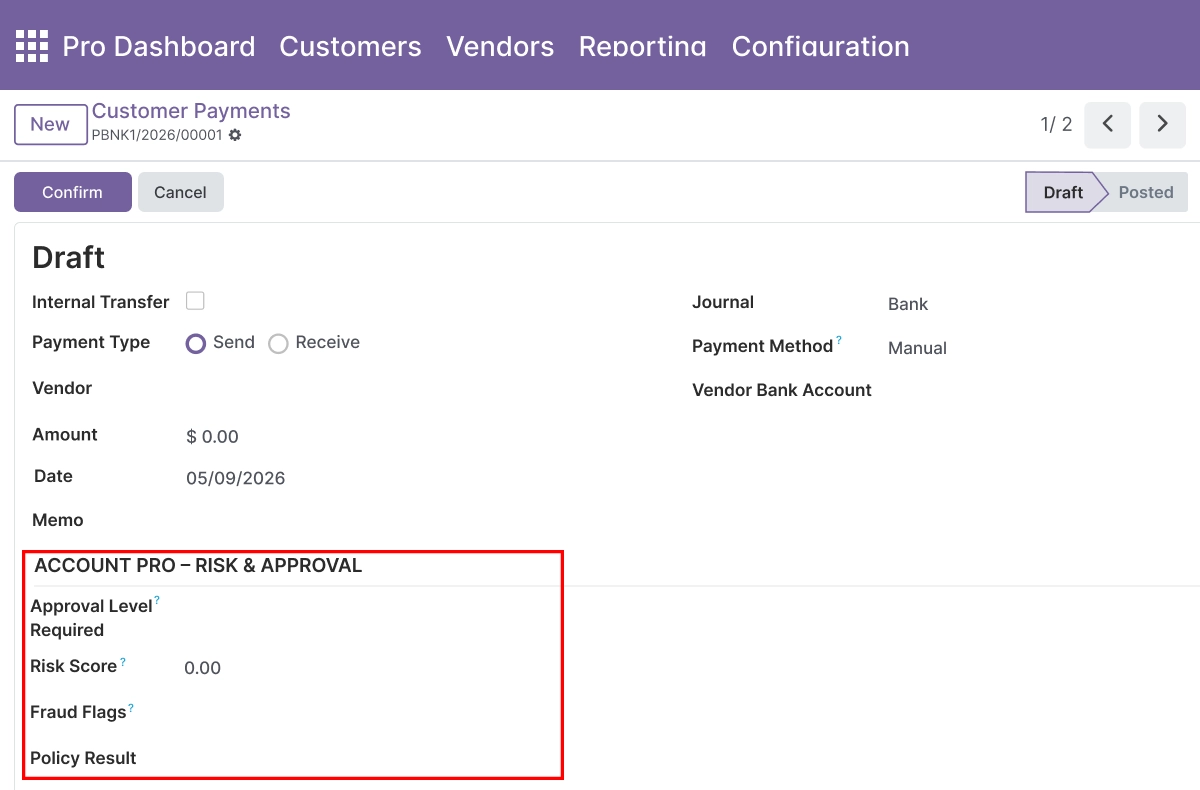
Payment Risk, Approvals, and Compliance
Strengthen payment governance with risk scoring and approval workflows.
- Capture a risk score on each payment for visibility into transaction exposure
- Apply approval levels for sensitive or high-value payment transactions
- Track fraud flags and policy check results directly on the payment record
- Link payments to compliance checks and sanctions screening outcomes
- Reduce exposure to fraudulent or non-compliant payments with structured governance fields
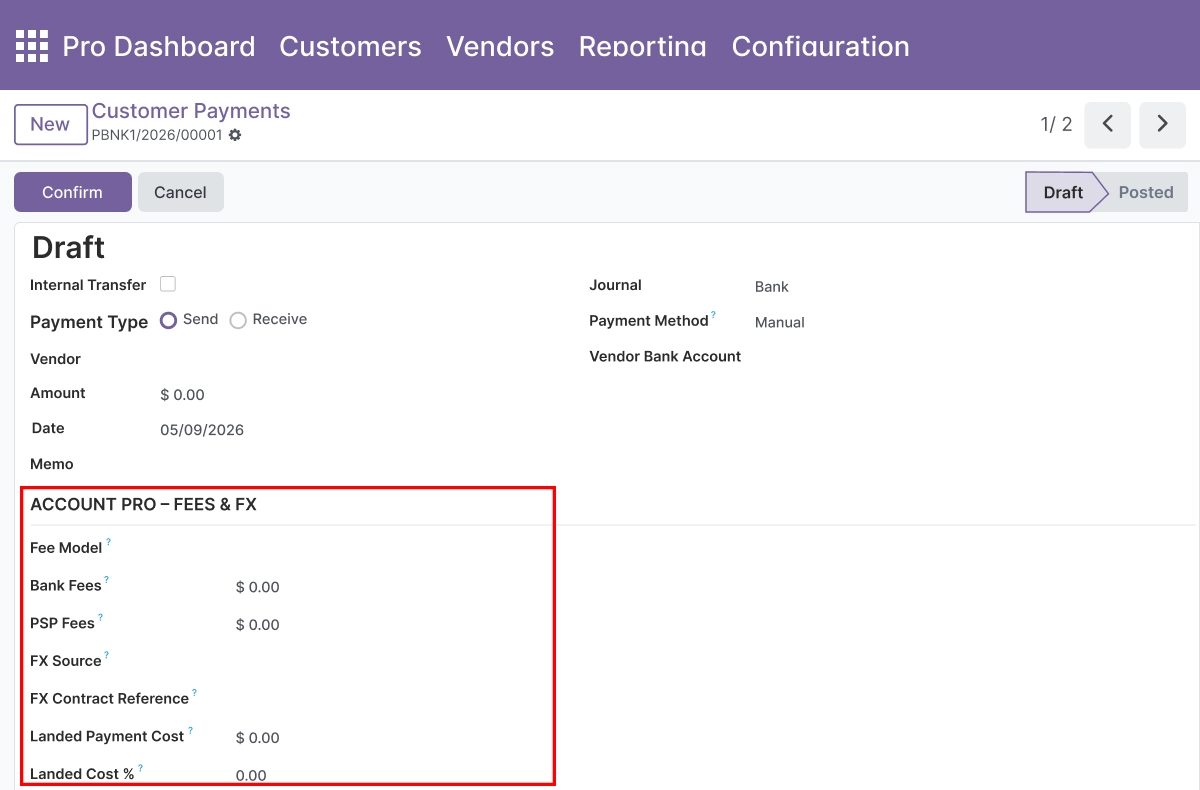
Fees, FX, and Treasury Management
Track the financial detail behind each payment for accurate treasury reporting.
- Record bank and PSP fees on each payment for accurate cost-of-transaction reporting
- Capture FX source and contract references for payments settled in foreign currency
- Track landed cost impact on individual payment transactions
- Assign payments to treasury buckets and liquidity priorities for cash planning and reporting
- Improve cash flow planning and FX reporting from the payment record level without external tools
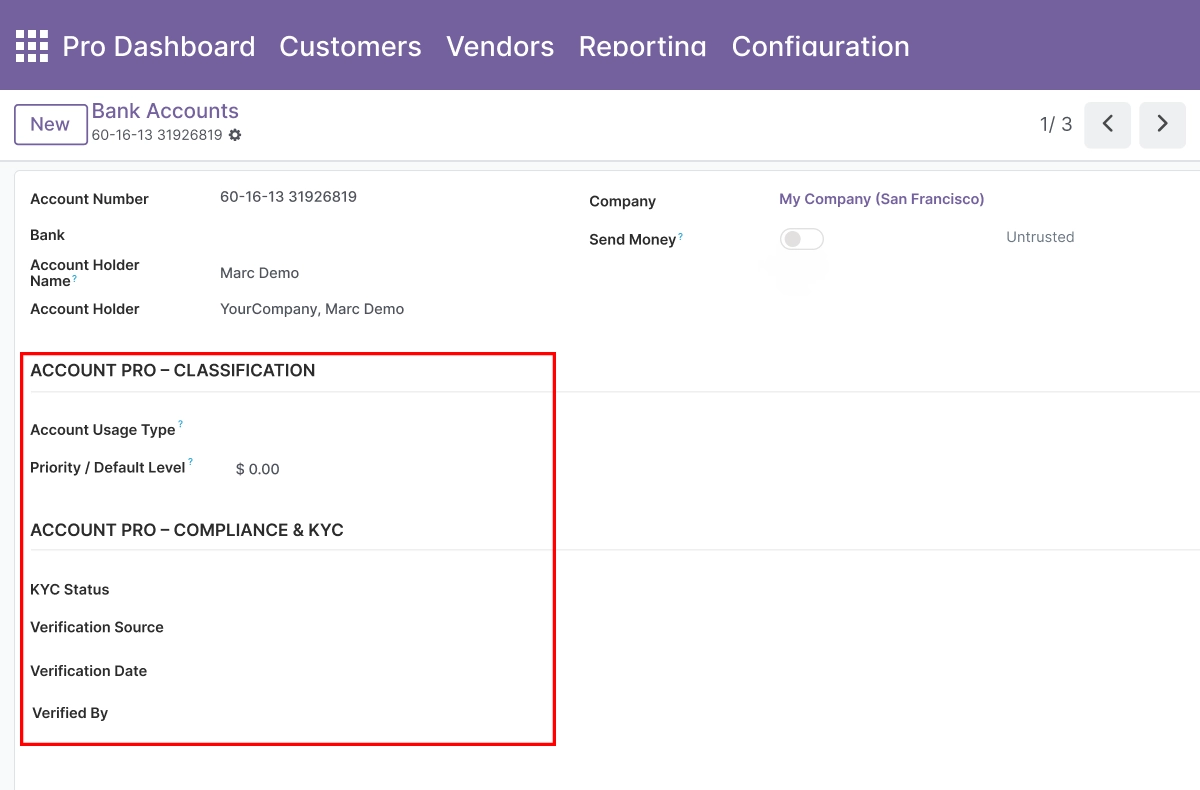
Bank Account Classification and KYC
Enrich bank accounts with operational, compliance, and risk metadata.
- Classify bank accounts by usage type and internal priority for routing and reporting
- Store KYC status and verification details on each partner bank account
- Capture risk level and fraud flags per account for compliance visibility
- Maintain change history references on bank accounts for audit purposes
- Strengthen compliance for partner bank data without requiring external KYC tools
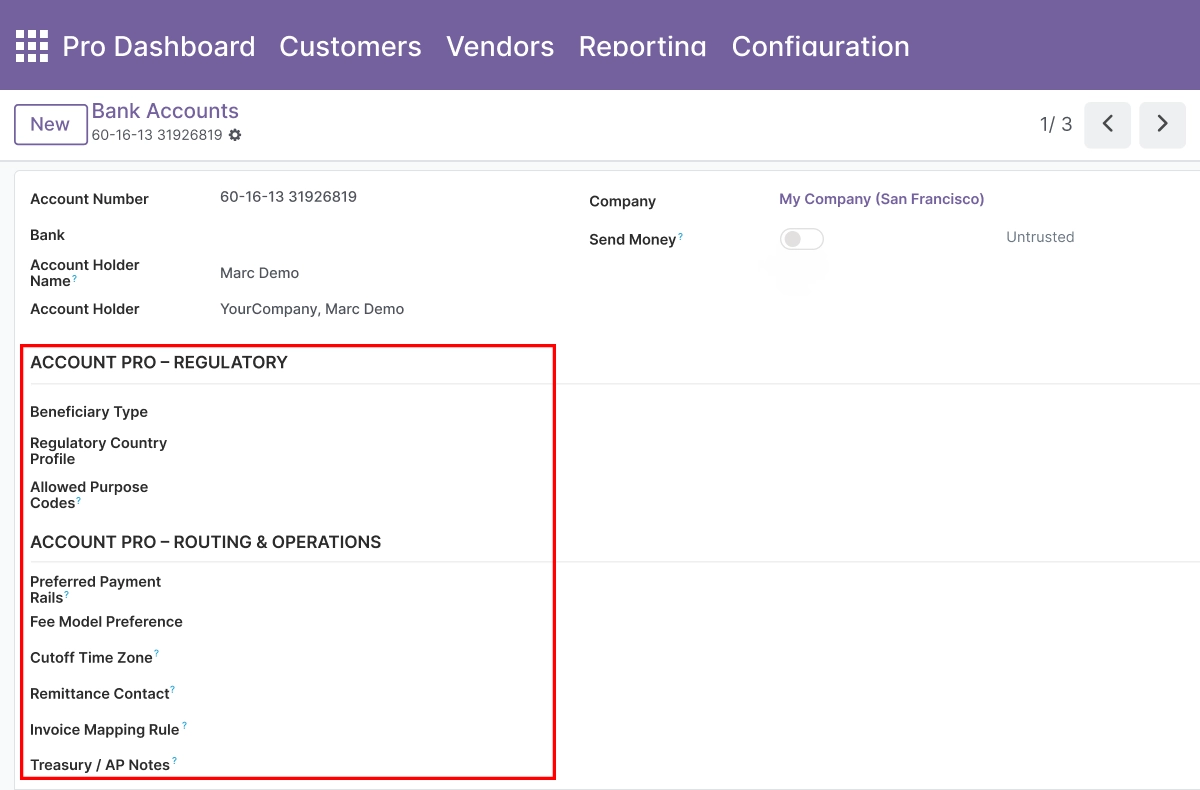
Bank Account Regulatory and Routing Information
Centralize regulatory and routing details for every partner bank account.
- Capture beneficiary type per bank account - individual, corporate, or other classification
- Maintain allowed purpose codes for transfers from each specific account
- Configure preferred routing rails per bank account for payment execution
- Add treasury notes for internal reference on accounts used for specific transaction types
- Build analytics-ready bank account data with structured regulatory and routing fields
Advanced Settings and Configuration
Feature toggles and access rights are managed from General Settings → Accounting Pro section. Administrators activate specific field groups for invoice lines, payments, and bank accounts and assign them to the appropriate user groups - finance, treasury, risk, or compliance - without code changes.
The settings panel covers:
- Feature toggles for invoice line field groups (quality, storage, regulatory)
- Feature toggles for invoice-level fields (communication profile, risk, credit control)
- Feature toggles for payment field groups (settlement, routing, risk, fees, FX, treasury)
- Feature toggles for bank account field groups (classification, KYC, regulatory, routing)
- Security group assignments — finance, treasury, risk, and compliance
- Extra filter and group-by options for accounting list views
How to Set Up Accounting Pro for Odoo
01
Install the App
Install Accounting Pro in your Odoo.sh or On Premise environment.
Result: The Accounting Pro fields and feature toggles appear in General Settings.
Result: The Accounting Pro fields and feature toggles appear in General Settings.
02
Enable Feature Groups
Go to General Settings → Accounting Pro section. Enable the field groups you need - invoice line fields, payment fields, bank account fields - using the feature toggles.
Result: Only the selected field groups are activated, keeping the interface clean for your team.
Result: Only the selected field groups are activated, keeping the interface clean for your team.
03
Configure Invoice Line Fields
Open any customer invoice or vendor bill. The quality, storage, traceability, regulatory, communication, and risk fields appear on invoice lines and in the Other Info tab.
Result: Finance teams can capture structured context directly on invoice records.
Result: Finance teams can capture structured context directly on invoice records.
04
Configure Payment and Bank Account Fields
Open any payment record or partner bank account. Settlement, routing, risk, fee, FX, and treasury fields appear in dedicated sections. KYC and regulatory fields are available on bank accounts.
Result: Treasury and compliance teams can capture structured payment and bank account data in Odoo.
Result: Treasury and compliance teams can capture structured payment and bank account data in Odoo.
05
Use Enhanced Filters and Group-bys
Use the additional search filters and group-by options on accounting list views to filter and analyze records by the new structured fields.
Result: Reporting and analytics built on richer, structured accounting data - no external exports needed.
Result: Reporting and analytics built on richer, structured accounting data - no external exports needed.
Who Is This App For?
This app is suitable for:
- Finance and accounting teams that need richer context directly on invoices and payments
- Treasury managers tracking cash flow, FX exposure, and liquidity priorities in Odoo
- Risk and compliance officers managing credit control, fraud flags, and KYC on accounting records
- Controllers and CFOs who need better analytics data from accounting transactions
- Odoo implementation partners working in regulated industries or multi-entity environments
- Organizations in finance, banking, or compliance-heavy sectors needing structured fields in Odoo
This app does not support Odoo Online. It requires Odoo.sh or On Premise.
Changelog
v19.0.0 — Initial Release
- – Added invoice line quality, storage, and traceability fields
- – Implemented regulatory, expiry, and returns tracking on invoice lines
- – Added communication profile and risk fields on invoices
- – Implemented customer credit control and collection strategy links
- – Added payment settlement strategies, routing profiles, and batch grouping
- – Implemented payment risk score, approval levels, and fraud flags
- – Added bank and PSP fee tracking with FX and treasury bucket fields
- – Implemented bank account classification, KYC, and risk metadata
- – Added regulatory, beneficiary, and routing fields on bank accounts
- – Implemented extra filters, group-bys, and feature toggles in General Settings
What does Accounting Pro add to Odoo Accounting?
It adds structured fields for invoice line quality, storage, traceability, and regulatory context; invoice-level communication profiles, risk levels, and credit control status; payment settlement strategies, routing profiles, risk scoring, fees, FX, and treasury fields; and bank account classification, KYC, regulatory, and routing metadata - all without changing Odoo's native posting, reconciliation, or tax logic.
Does it change Odoo's native accounting logic?
No. Accounting Pro extends existing Odoo Accounting models with additional fields only. Native posting, reconciliation, journal entry, and tax logic remain completely unchanged.
Which Odoo versions are supported?
The app supports Odoo 14.0, 15.0, 16.0, 17.0, 18.0, and 19.0.
Does this app work on Odoo Online?
No. Accounting Pro requires Odoo.sh or On Premise deployment. Odoo Online is not supported.
Which Odoo accounting models does it extend?
It extends invoice lines (account.move.line), invoice headers (account.move), payment records (account.payment), and partner bank accounts (res.partner.bank) with additional structured fields.
Can I control which field groups are active?
Yes. Each field group - invoice line quality, storage, regulatory, communication, payment settlement, payment risk, fees and FX, bank account KYC, and bank account routing - can be enabled or disabled independently from General Settings.
How does the credit control and risk scoring work?
Risk level and credit control status fields are added to customer invoices. You link each invoice to a collection strategy and configure auto-reminder behavior directly on the record. Risk scores on payments capture transaction-level exposure for review or approval workflows.
Can treasury teams use this separately from full accounting access?
Yes. The module includes security groups built for finance, treasury, risk, and compliance roles. Administrators assign field visibility and access per group so treasury teams see treasury-relevant fields without requiring full accounting configuration access.
What KYC fields are added to bank accounts?
Bank account records are extended with KYC status, verification details, risk level, fraud flags, beneficiary type, allowed purpose codes, preferred routing rails, and treasury notes - all stored on the partner bank account record in Odoo.
Is this suitable for Odoo implementation partners in regulated industries?
Yes. Partners working in banking, finance, insurance, or regulated sectors can use this app to deliver structured accounting data capture for clients on Odoo.sh or On Premise, covering invoice compliance, payment governance, treasury tracking, and bank account KYC as part of a finance implementation.